Inspiring
Jan 10, 2022 12:57 PM UTC
Answered

Start Photoshop & run script without user interaction

Hey


I'm in need of running script in photoshop without it 
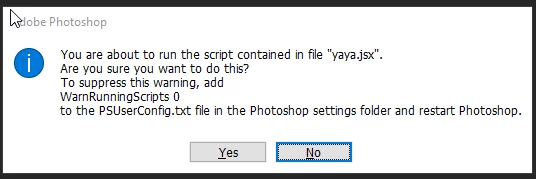
Asking for that.

I want to start PS & run Script, ur run script in already running PS.

I don't want to add settings entry in PSUserConfig.txt file. 

Any ideas how that can be done?

I know that vscode/extendtoolkit are able to send messages to PS without that "pop-up" as thats how we run scripts there... any idea how to piggy back off them?

My current command

"C:\Program Files\Adobe\Adobe Photoshop 2022\Photoshop.exe" -r "C:\Users\Master\Desktop\yaya.jsx"

Regards

Dariusz

This topic is closed to new replies. Start a new post to keep the conversation going.
Kukurykus
KukurykusCorrect answer
Legend
Jan 10, 2022 2:30 PM UTC

Why don't you make part of script that edits that .txt file to update of necessary line?

12 replies

Kukurykus
KukurykusCorrect answer
Legend
Jan 10, 2022 2:30 PM UTC

Why don't you make part of script that edits that .txt file to update of necessary line?

Translate
Inspiring
Jan 10, 2022 2:47 PM UTC

Id rather not edit photoshop user preferences just so I can hide my evil scripts 😄 Also if the file is located in secure loca tion /program files. I probably wont be able to anyway...


Translate
Kukurykus
Legend
Jan 10, 2022 2:59 PM UTC

It's not in secure only read Program Files folder, but in read/write User Preferences folder.

Translate
c.pfaffenbichler
Community Expert
Community Expert
Jan 10, 2022 2:10 PM UTC

If I undersatand you correctly you could try using 

File > Scripts > Script Events Manager 

instead and link the Script to the »Start Application«-event. 

Translate
Inspiring
Jan 10, 2022 2:20 PM UTC

Hey

Interesting idea, thank you! But it wont work, I want to send different scripts /etc.

I dont want user to have to configure anything except for just running my app & that run scripts in ps.

Regards

Dariusz

Translate