This has been a topic for years, so I can’t fathom why it still happens. When I open an old JPEG and make a few mods and then chose Save As or Save a Copy the creation date changes to the present moment. When I check File Info before saving the creation date is correct.
Most versions of the macOS Finder had no way to display EXIF Date Time Original, not even using View Options. So when the Finder says Date Created, that’s always been the date the file was created in the computer file system, not EXIF Date Time Original.
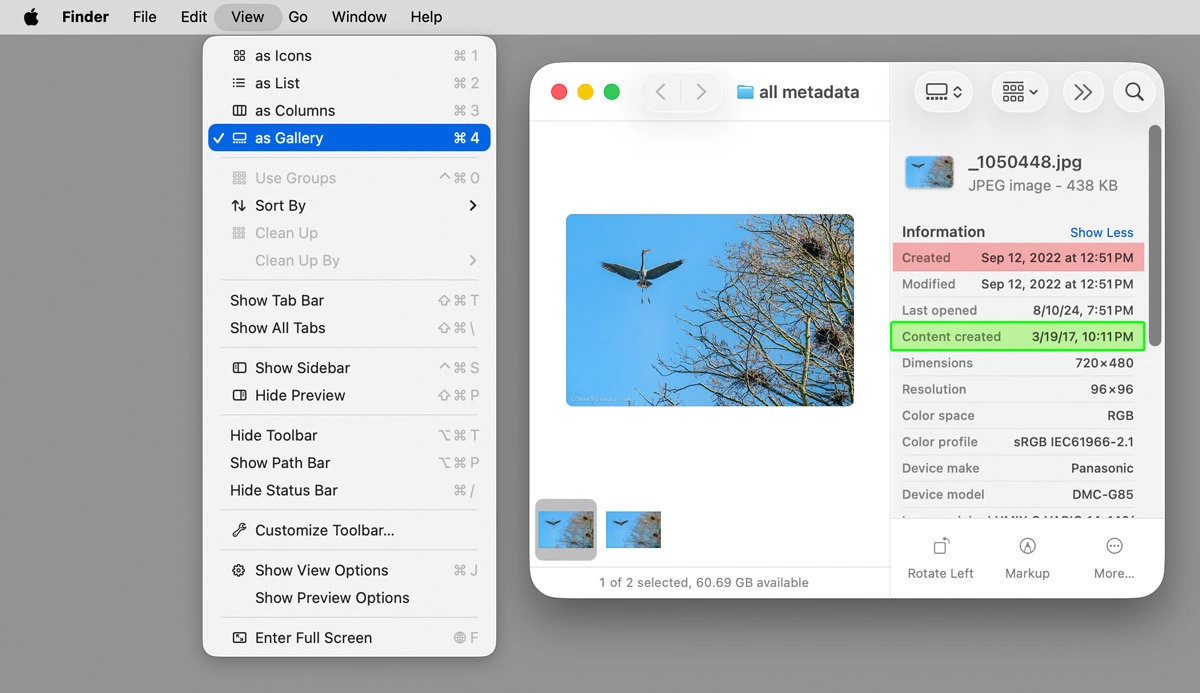
However, in recent versions of macOS, you can see EXIF Date Time Original if you set the current Finder window to Gallery view (Finder menu command View > as Gallery), as shown in the picture below. This picture is in macOS 26, although it’s been possible since whatever version it was of macOS that Apple added Gallery View to the Finder.
In the picture below of Gallery view, the Finder lists the file creation date as “Created” (Sep 12, 2022, red highlight), but the date I actually took the picture is where it says “Content created” (3/19/17, green highlight).
so I wonder how Photo pros deal with this.
Because the Mac Finder doesn’t display much EXIF/IPTC metadata (you can actually view more on the Windows desktop), I long ago developed the habit of browsing photos in a Mac application that does have more extensive EXIF/IPTC display, such as Adobe Bridge, Apple Preview, Adobe Lightroom Classic, GraphicConverter (a versatile shareware image utility since the early days of the Mac), xnView MP, and others.
On further examination of the saved file in Preview, the Date Time Original and Date Time Digitized are retained properly, but the Finder displays the created date as the today’s moment of save with Photoshop. Does that make it an Apple bug? Preview can get it right but the Finder can’t? Get Info also has today’s date as the creation date.
10 minutes later... It’s the way the Mac OS works, so I wonder how Photo pros deal with this.




 AdChoices