
Participant
July 29, 2020
Answered

Strange tile menu popping up when I type

  • July 29, 2020
  • 2 replies
  • 702 views

Ever since I updated to the latest version, whenever I type numbers (and possibly specific ones) when I'll mark them with the intention of typing something instead, this little tile menu thing pop up and won't go away unless I move my cursor away, practically blocking me from writing.
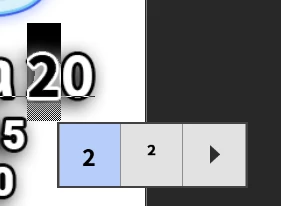
 

Anyone knows of this thing and can tell me how do it get rid of it? I'm using Middle-Eastern support for typing (The whole typing experience became altogether frustrating since the update, I don't know why but the ME languages support doesn't work the same. Would love some advice on that as well)

Correct answer Jeff Arola

That's for On-canvas glyph alternatives and can be disabled by going to Edit>Preferences>Type (windows) or Photoshop>Preferences>Type (mac) and unchecking Enable type layer glyph alternatives


https://helpx.adobe.com/photoshop/using/glyph-panel.html


2 replies

Okan5CA7
Inspiring
September 23, 2021

I've added a SS. I don't f**ng need this feature. I only want to type or change it when i double click a text layer. Sorry for my anger but this always slows my flow and causes photoshop crash. 


Jeff Arola
Community Expert
Jeff ArolaCommunity ExpertCorrect answer
Community Expert
July 29, 2020

That's for On-canvas glyph alternatives and can be disabled by going to Edit>Preferences>Type (windows) or Photoshop>Preferences>Type (mac) and unchecking Enable type layer glyph alternatives


https://helpx.adobe.com/photoshop/using/glyph-panel.html