Participant
September 23, 2025
Answered

Struggling to create a square or oblong frame using the 'stroke' feature

  • September 23, 2025
  • 2 replies
  • 148 views

I want to create a simple oblong shape - not filled but framed - so a lined oblong through which you see the background image. For some reason my photobox does not seem to allow me to use this very basic feature. Can anyone explain how you do  this so I can see if I am doing it right? If I am then it might be some kind of glitch with my photoshop. They have told me that my internet is 'slow' - woud this effect a feature like this? 

Correct answer Trevor.Dennis

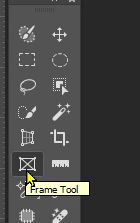
Hi Nelson.  Check out the Frame tool


Drag out your frame, and Place Embedded, or paste, your image into it.


There are now a lot more options on the shapes you can use with the Frame tool

2 replies

Trevor.Dennis
Community Expert
Trevor.DennisCommunity ExpertCorrect answer
Community Expert
September 23, 2025

Hi Nelson.  Check out the Frame tool


Drag out your frame, and Place Embedded, or paste, your image into it.


There are now a lot more options on the shapes you can use with the Frame tool

Glenn 8675309
Legend
September 23, 2025


This is what I understand you need help with- just select the no fill option the arrow is pointing to.

HOWEVER:   it sounds as if you may want to make a clipping mask- where an image fills a shape- if that is true get the image above the sahe in the layers panel, right click on the image, choose "create clipping mask"