



Mascot Graphics
Known Participant
July 13, 2021
Question

Swatches folder

  • July 13, 2021
  • 3 replies
  • 5216 views

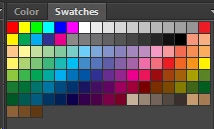
In every version of Photoshop that I've used, the default swatch library was as shown in the attached image. I had it in 5.0, 5.5, 6.0, and in CC. Now I've purchased the subscription based and the swatch libraries are not even close. Many times I'm creating a basic graphic and want to select default colors, but I can't find this swatch library.... what am I missing? When I first opened Photoshop I had black and white. I've been through all of them... can't find it. Would be nice to have it back, it makes things a little easier than having to mix a color every time. Thanks... still just learning the new features...
 

3 replies

Participant
September 7, 2023

@Mascot Graphics I am frustrated with the same problem. @J E L is incorrect and I don't know why they said that, there is no "add to swatches" option in the hamburger menu, at least not on windows. After going through various fake answers in the forums for a half an hour to just find colors,  I gave up and called customer service at Adobe.

So here's the real answer according to the Adobe rep: stop wasting your time, there is no fix. This is an intentional part of the update, they decided instead of looking at what swatches we need, they would put them all in file folders and theres no way to go back to a simple palette of swatches like it was before. I'm skeptical still.. you posted this in 2021 and I for sure had a regular swatch palette like a month ago (2023).. 

LouLouBritishRacingSilks
Participant
November 3, 2025

I have just added my lost swatches, as I gussed that there is no way of getting my Swatches back. Took a while but have now saved them incase this happens again. 

melissapiccone
Community Expert
Community Expert
July 14, 2021

They are all there in different places.  You can control how they look and find more under the fly out menu in the upper right corner of the swatches panel. I never use the swatches in PS. I create colors and save them in my Library - it's a better workflow, give it a shot. If you are missing some of these - it looks like you are from your screenshots, just reset them or you can reset your preferences.

Melissa Piccone | Adobe Trainer | Online Courses Author | Fine Artist
J E L
Community Expert
Community Expert
July 13, 2021

@Mascot Graphics Try this. Open a new blank document. In your Swatches panel, highlight and open the Libraries you want (i.e., Default Swatches, Art & Illustration). From that panel, select the swatches and from the hamburger menu, choose Add to Swatches. Close the document without saving. Now all new documents will have those swatches available.

Mascot Graphics
Known Participant
July 13, 2021

Hi...
Thanks, but the problem I'm having is that the swatch library (shown in my message) doesn't exist in any of the libraries.  When I first opened PS, I had a black square and a white square - and that's it. I've since gone through all libraries - including the 'legacy' library, and they're all limited to certain palette colors, and no where near the number of colors in the image. I'm trying to figure out why I can't get a palette with all of the colors that were in prior version without having to recreate all of those colors and add them to a custom palette.

J E L
Community Expert
Community Expert
July 13, 2021

@Mascot Graphics Ah, you know what? I thought I was on the Illustrator board. My apologies! Okay, in Photoshop, I see what you mean. Yes, it's very different. If you didn't save the swatches before, perhaps there isn't a way to regenerate them? You could do a search of your system for .aco files to import them?