
Known Participant
Nov 13, 2026 10:09 PM UTC
Answered

Switching to Pen Tool removes Shape properties from the panel

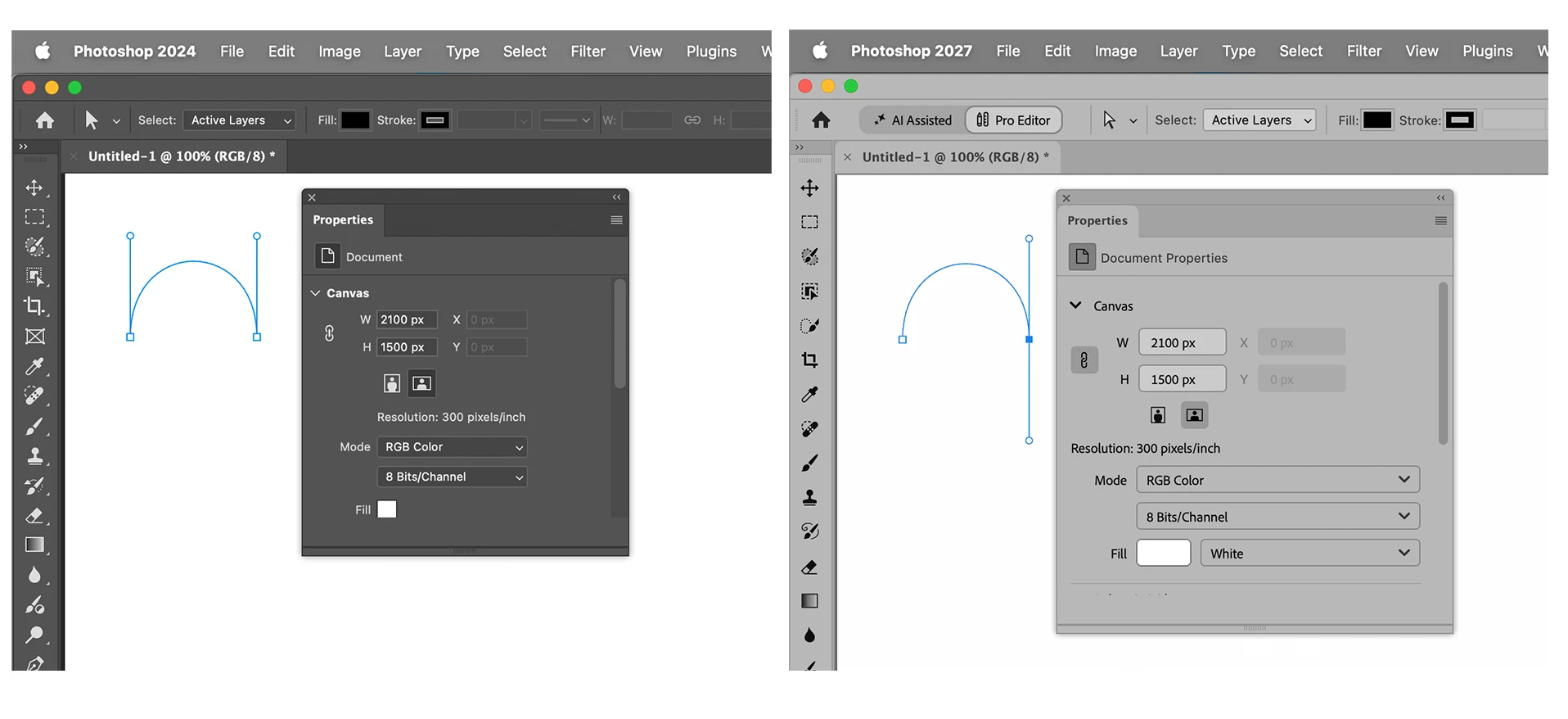
I draw a shape with the Shape tool and can see all the properties in the Properties Panel: Mask or Shape icons, plus Fill, Stroke, etc. Then I switch to the Pen tool and the only properties that remain are the Mask properties. In the top menu bar my Pen tool is set to Shape, not Path or Pixels.

Didn’t the Properties panel show the Shape properties (fill, stroke) instead of disappearing when the Pen tool is set to Shape? Is this a bug or am I doing something wrong?

    jane-e
    jane-eCorrect answer
    Community Expert
    Nov 16, 2026 2:18 AM UTC

    ​@digitaltwist wrote: Is this a bug or am I doing something wrong?


    I tested with 2024 (25.12.4) and 2027 (28.0.0) on macOS and see what you are seeing. ASFAIK, this is how it works. I don’t think it’s a bug and I don’t think you are doing anything wrong. 

    If it’s different for Ged, it’s because he is on Windows, and he’ll let us know.

    The Pen tool is not a Shape tool, although it can draw in Shape mode. It’s in the Pen Group with the other pen tools. The properties for the Shape tools are different than they are for the Pen tool.

    Jane

    P.S.: Hi Ged!


    6 replies

    Known Participant
    Nov 16, 2026 4:39 PM UTC

    I think this is just sloppy UX design, not a bug. I’ll see if I have some time to post this to the FEATURE REQUEST section. Thanks for making this ANSWERED!

    Translate
    jane-e
    Community Expert
    jane-eCommunity ExpertCorrect answer
    Community Expert
    Nov 16, 2026 2:18 AM UTC

    ​@digitaltwist wrote: Is this a bug or am I doing something wrong?


    I tested with 2024 (25.12.4) and 2027 (28.0.0) on macOS and see what you are seeing. ASFAIK, this is how it works. I don’t think it’s a bug and I don’t think you are doing anything wrong. 

    If it’s different for Ged, it’s because he is on Windows, and he’ll let us know.

    The Pen tool is not a Shape tool, although it can draw in Shape mode. It’s in the Pen Group with the other pen tools. The properties for the Shape tools are different than they are for the Pen tool.

    Jane

    P.S.: Hi Ged!


    Translate
    Ged_Traynor
    Community Expert
    Community Expert
    Nov 16, 2026 8:31 AM UTC

    ​@jane-e I think I was be getting confused about what the OP was asking 😉

    Translate
    jane-e
    Community Expert
    Community Expert
    Nov 16, 2026 10:51 AM UTC

    ​@Ged_Traynor 
    We’ve all done that! 🙂

    Translate
    Ged_Traynor
    Community Expert
    Community Expert
    Nov 14, 2026 11:38 AM UTC

    ​@digitaltwist you haven’t mentioned which version of Photoshop you have, but it’s working as expected for me with Photoshop version 28.0

    Try resetting the tools

    If that doesn’t help, try manually resetting the Photoshop preferences


    Translate
    Known Participant
    Nov 15, 2026 11:58 PM UTC

    Yeah, I’m on v 28 for Mac. 

    Translate