
Participating Frequently
February 27, 2025
Question

Tabs and Drop-downs All Tiny

  • February 27, 2025
  • 9 replies
  • 387 views

I am using Photoshop (web version) on a Windows PC Win 10 with a 27" monitor.

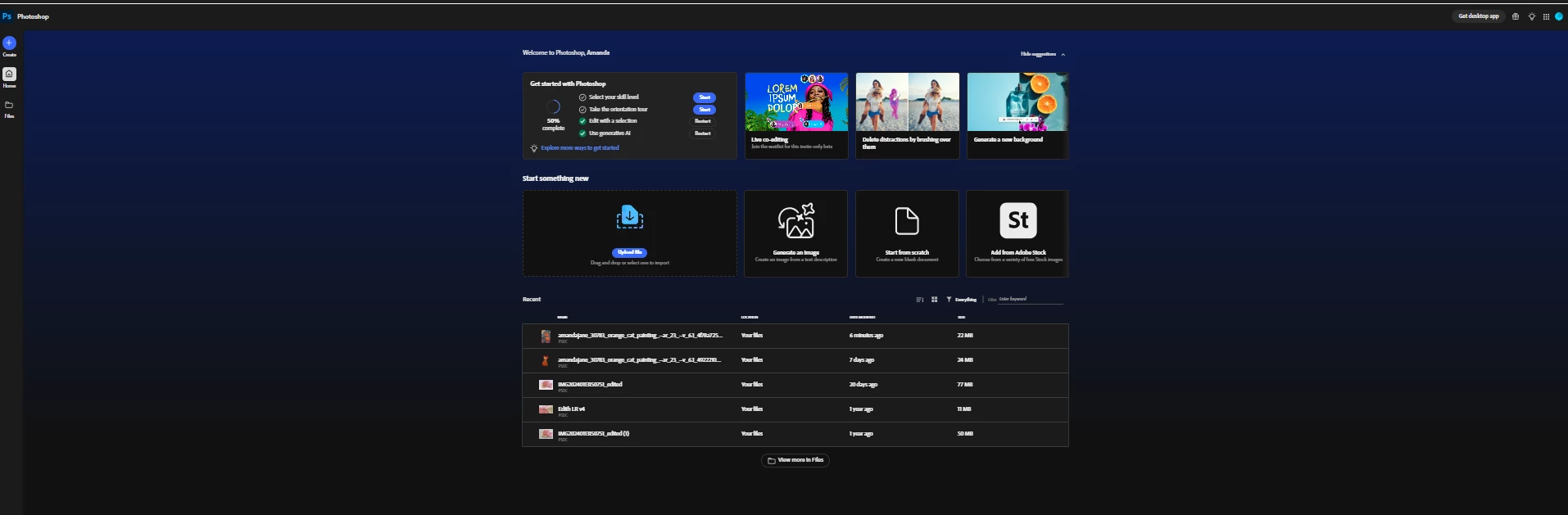
Since this morning all the tabs, drop down menus and everything else (apart from the actual image I might be working on) are TINY.  So tiny I can't read them even if I stick my eyes 1" in front of them !

All other websites, apps etc are working normally.

What on earth is happening please ?  It is seriously holding up my work flow.

How can I fix this please. 

Thank you,

Amanda


9 replies

Community Manager
February 28, 2025

Thanks Amanda! 
Please let me know if adjust Zoom in Chrome helps.

Participating Frequently
February 28, 2025

My resolution is 1920 x 1080 0 no idea re zoom %.

I will now go check that.

Amanda

Participating Frequently
February 28, 2025


Participating Frequently
February 28, 2025

Hi Benjamin,

Here is a full screen, screen shot of Edge with PS (web) open.

PS I am on a desktop not a laptop.

Amanda

Community Manager
February 28, 2025

Hi Amanda - if you go to System > Display on your windows device, what are the display and resolution settings? They should be 150% and 2496X1664. Chrome also controls the Zoom on your browser and can adjust based on the monitor type. Go to Chrome > Appearance > and check the zoom level. It should be at at least 100%

Community Manager
February 28, 2025

Amanda - can you provide a screenshot of what Edge looks like on your monitor so we can compare? Thank you!

Participating Frequently
February 28, 2025

Hi again CMass,


OK I just tried Photoshop (web) in Microsoft Edge, and it works perfectly and the correct size.


I never use Edge though, so that result is very frustrating lol

There must be something I can change on Chrome - unless it's a PS (web) bug/glitch that I can do nothing about grrrr


Amanda

Participating Frequently
February 28, 2025

I am using the latest version of Chrome.

Win 10.


I have not tried another brower.... I will try Edge.

MassC
Legend
February 27, 2025

Oh dang… you’d need a magnifying glass to read that! What browser are you using, and does this happen in all browsers? ^CM