


Inspiring
June 1, 2025
Answered

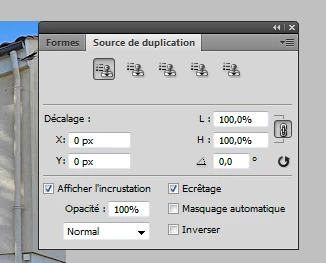
Tampon de duplication déplace la fenêtre

  • June 1, 2025
  • 3 replies
  • 428 views

Bonjour

Après avoir sélectionné la zone que je veux dupliquer (alt+ clic) le alt+ clic se tranforme en symbole d'outil de déplacement.

Et si je bouge la souris la fenêtre se déplace.

Avant je n'avais pas ce problème.

Photoshop Cs4  win 7

Merci pour l'aide.
 

Correct answer Saralden

I founded: I must use opt +alt+clic, not only alt .

I don't know why.... anyway it works 

Thanks for help

3 replies

Jeff Arola
Community Expert
Community Expert
June 1, 2025

I would try a reset of the Photoshop CS4 preferences by presssing and holding Alt+Control+Shift just after Photoshop CS4 begins starting. Keep holding the keys until you get the below dialog.

(you have to be quick about pressing the keys or you won't get the following dialog)


Click Yes to delete the Adobe Photoshop settings file.


SaraldenAuthorCorrect answer
Inspiring
June 2, 2025

I founded: I must use opt +alt+clic, not only alt .

I don't know why.... anyway it works 

Thanks for help

Jeff Arola
Community Expert
Community Expert
June 1, 2025

In the Clone Source panel if you uncheck Afficher l'incrustation (Show Overlay) does it still happen?


You can also try a reset of the Clone Stamp Tool by right clicking on the Clone Stamp icon in the Tool Options bar and clicking Reset Tool.


SaraldenAuthor
Inspiring
June 1, 2025

uncheck Afficher l'incrustation (Show Overlay) : same problem

I alredy did it (Reset Tool). : same problem


Glenn 8675309
Legend
June 1, 2025

Not too many people are running 17 year old software on unsupported operating systems.  It's virtually impossible to help in this case.

SaraldenAuthor
Inspiring
June 1, 2025

well! i do