jmoses123
Participant
Oct 16, 2018 4:29 PM UTC
Answered

Text Box Auto Fills with Lorem ipsum text

How do I stop the text box from auto filling in photoshop?  It used to just be an empty box when I placed it on the image before the update.

This topic is closed to new replies. Start a new post to keep the conversation going.
Sahil.Chawla
Sahil.ChawlaCorrect answer
Adobe Employee
Oct 16, 2018 4:41 PM UTC

Hi there,

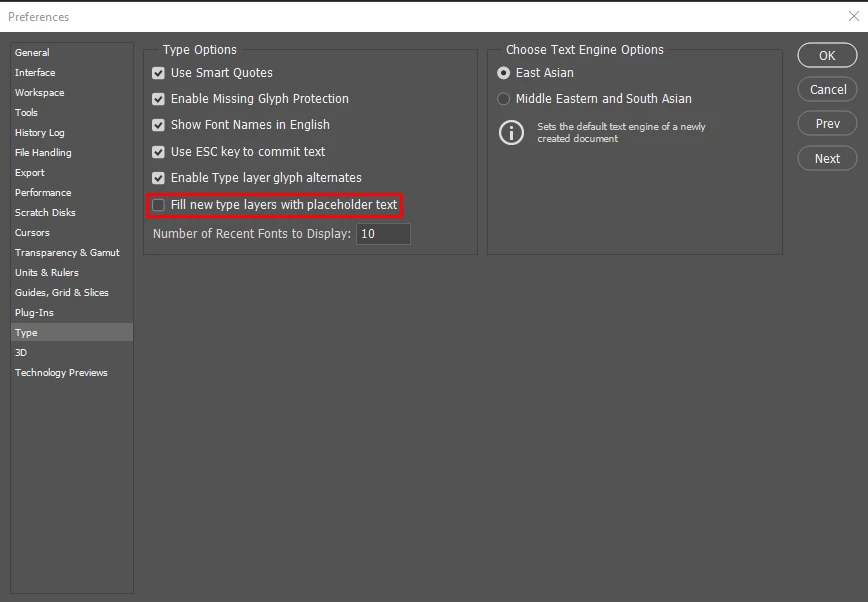
As you're getting a placeholder text please go to Photoshop's Preferences > Type and deselect "Fill new type layers with Placeholder text" and let us know if it helps.

Regards,
Sahil

11 replies

Participant
Aug 29, 2026 7:26 AM UTC

does not show these words


Translate
Trevor.Dennis
Community Expert
Community Expert
Aug 29, 2026 8:48 AM UTC

Hi Glenda.  To turn on this feature open Preferences > Tools and check Fill new type layers with placeholder text.

It’s a useful feature and one I’d hate to be without.

Good luck.

Translate
dkangy
Participant
Dec 27, 2020 8:00 PM UTC

This is exactly why I dread updates. Two cups of coffee later and my workspace is finally (somewhat) back to normal.

Translate
rodneyk49776409
Participating Frequently
Nov 11, 2021 2:41 AM UTC

I hate updates too!  Give me photoshop from 10 years ago.. and never change or update or "improve" anything.  Fire all developers and leave it as it was.  I don't want anything to change.

Translate
Participant
Oct 2, 2020 3:41 AM UTC

Why do updates cause "silly stuff" to happen, some normal functions to cease and otherwise cause annoyances?


Translate
llulbaby
Participant
Aug 11, 2020 9:34 AM UTC

Such a simple solution.   Thank you for your help.

Translate
Sahil.Chawla
Adobe Employee
Sahil.ChawlaCorrect answer
Adobe Employee
Oct 16, 2018 4:41 PM UTC

Hi there,

As you're getting a placeholder text please go to Photoshop's Preferences > Type and deselect "Fill new type layers with Placeholder text" and let us know if it helps.

Regards,
Sahil

Translate
Known Participant
Jun 19, 2020 1:30 PM UTC

I had the same problem. Glad I found this, it help me and it stopped it.


Thank you Sahil

Translate