


Question
Text in clipboard? appearing all across the page
Hi,
For a while now (maybe 4-5 months) when I edit an exisitng text field in one of my templates by pasting text, the previously pasted text (that was previously in my clipboard) shows all over the page.
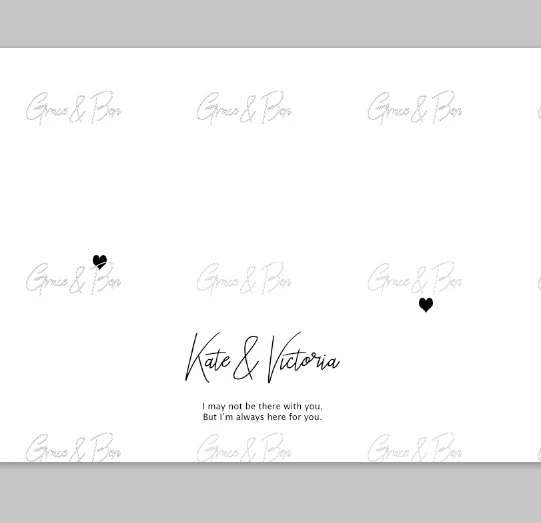
In this example:
-Replaced text 'Kate & Vicotria' by copy and pasting
- 'Grace & Ben' are names that were previously in my clipboard (from another file) before copying K&V and then they instantly appear all over the page
- This also happened with the quote text layer below
- If I click with the text tool, they disappear but sometimes it takes a few goes
- If I don't notice (sometimes it happens in white) I then close photoshop and then re-save the file, fixes the problem.
But why does this happen? And how do I stop it?
Thanks in advance
 AdChoices