
Inspiring
January 11, 2025
Answered

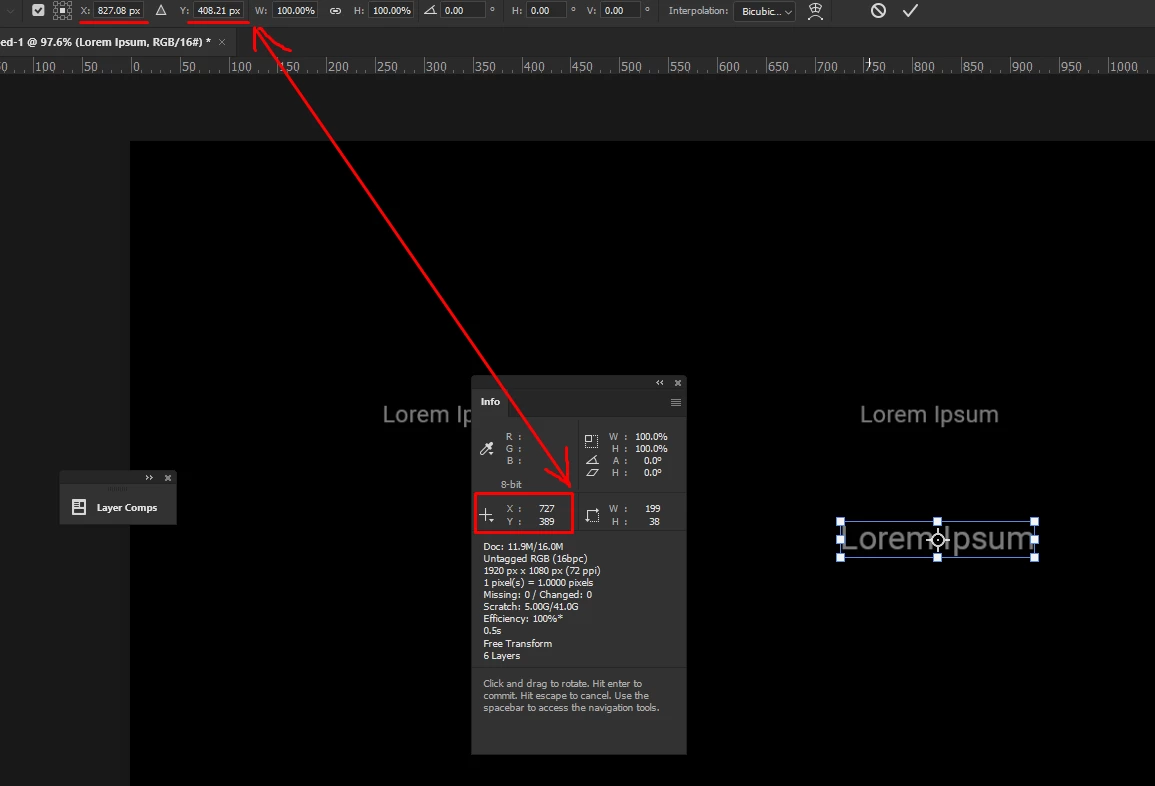
Text info location is different to the tool bar

  • January 11, 2025
  • 1 reply
  • 271 views

Hi community.


Why does the tool bar show decimal numbers in the tool bar, but the info panel numbers X and Y location is squared off? is there a way to make the toolbar square off these numbers? without manually deleting the decimal numbers.

Thank you.


Correct answer Stephen Marsh

When the transform is active, the info panel reports the upper-left value in the current ruler units, while your screenshot of the transform has the middle-centre anchor point active and this may or may not be set to a matching unit of measure. To get a better understanding of this, don't use a text layer, just create a pixel layer at a known size and then compare the transform anchor points for upper-left, middle-centre, lower-right etc.

1 reply

Stephen Marsh
Community Expert
Stephen MarshCommunity ExpertCorrect answer
Community Expert
January 12, 2025

When the transform is active, the info panel reports the upper-left value in the current ruler units, while your screenshot of the transform has the middle-centre anchor point active and this may or may not be set to a matching unit of measure. To get a better understanding of this, don't use a text layer, just create a pixel layer at a known size and then compare the transform anchor points for upper-left, middle-centre, lower-right etc.

Inspiring
January 12, 2025

Thank you.


Stephen Marsh
Community Expert
Community Expert
January 12, 2025
quote

Thank you.


By @Stefan Cargoski


You're welcome!