
Participant
June 3, 2025
Question

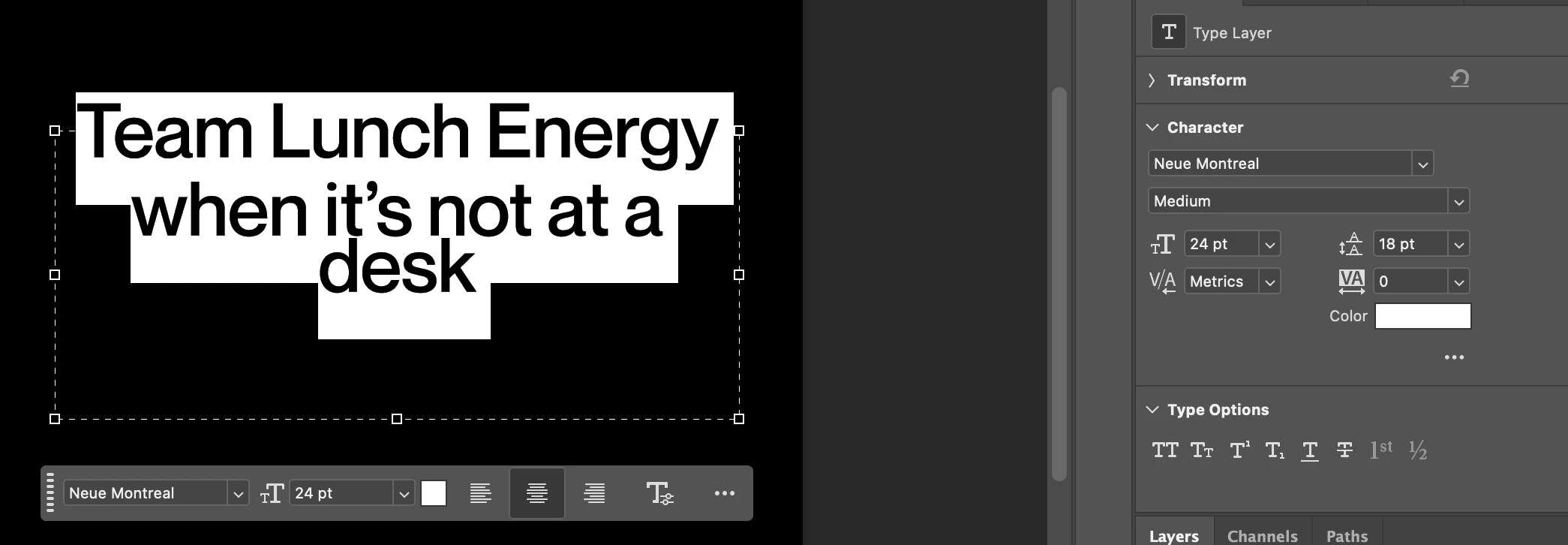
Text is going outside of text box and has irregular leading

  • June 3, 2025
  • 2 replies
  • 175 views

I can't figure out how to fix this leading issue. The first line in the text box follows different leading than the other lines, even when i manually enter them to be consistent. I tried resetting my photoshop preferences and quitting the app and it is still doing it.  
2 replies

Trevor.Dennis
Community Expert
Community Expert
June 3, 2025

Whoops, I got that wrong.


This is the vertical offset.  We can't see that in your screenshot, but I suspect it might have something other zero in that field if you click on the three dots (my second screen shot) or use the Character panel.


This is not the first time we have seen people confused by the conextaul nature of the Properties panel.  It doesn't even show a scroll bar when there is hidden content. We have to know that the three dots might reveal more of the panel and other fields.

Conrad_C
Community Expert
Community Expert
June 3, 2025

It might not be about leading. Some other things to check, as shown in the demo below:


In Properties panel, Character options (or the Character panel) look at Baseline Shift.


If those are actually two separate paragraphs, in Properties panel, Paragraph options (or the Paragraph panel) look at the Space Before and Space After paragraph settings.


I’m guessing it’s about paragraph spacing.