
Inspiring
September 22, 2024
Answered

Text margins or padding within a shape

  • September 22, 2024
  • 1 reply
  • 1640 views

Very, very basic question.


I am placing a text box on a photo in photoshop.  The box is rectangular and will have a background color.  I am entering justified text into the shape.  I need to have a margin or padding between the text and the rectangular shape.


How can I do this please?
Correct answer Bojan Živković11378569

There are two methods that come to mind:


Free Transform Path, which is used as a container. With the Type layer selected, press Ctrl + T. Make sure that Free Transform Path is checked in the Edit menu to ensure you are scaling only the path. Unlink W and H in the Options bar and scale both separately to 40px, for example. This way, you will add a 20px margin/padding on each side.


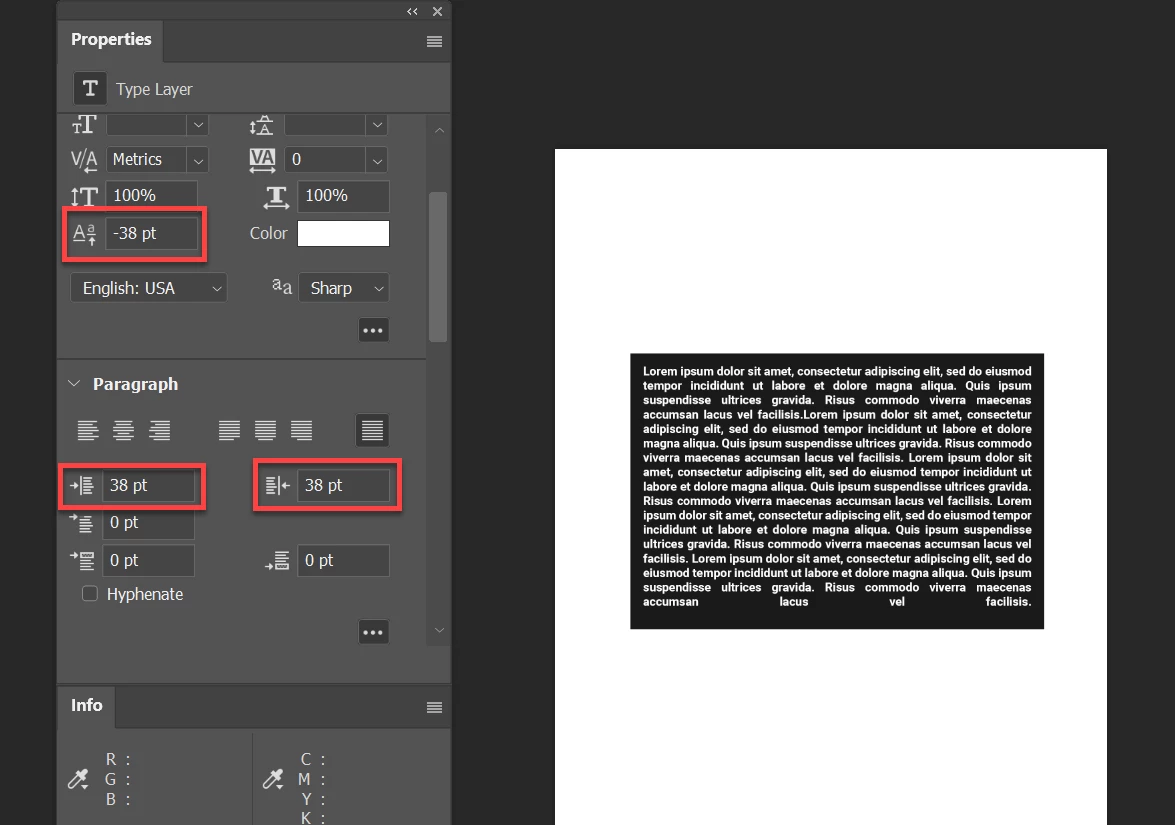
Use the Properties panel as shown below in my screenshot.


1 reply

Bojan Živković11378569
Community Expert
Community Expert
September 22, 2024

There are two methods that come to mind:


Free Transform Path, which is used as a container. With the Type layer selected, press Ctrl + T. Make sure that Free Transform Path is checked in the Edit menu to ensure you are scaling only the path. Unlink W and H in the Options bar and scale both separately to 40px, for example. This way, you will add a 20px margin/padding on each side.


Use the Properties panel as shown below in my screenshot.


JohnnyAirAuthor
Inspiring
September 22, 2024

I tried but not enough info there for me to follow Bojan.  Also, you mention two methods.

John Waller
Community Expert
Community Expert
September 22, 2024

Bojan's reply outlines two methods: 1) Free Transform or 2) lifting the baseline (gives a bottom margin) and paragraph indents (left/right margins) per the screenshot which shows Textbox Properties.


Try the screenshot method first. Start with the settings highlighted in red by Bojan.