
Participant
December 13, 2023
Answered

TGA Export is no longer there?

  • December 13, 2023
  • 1 reply
  • 2345 views

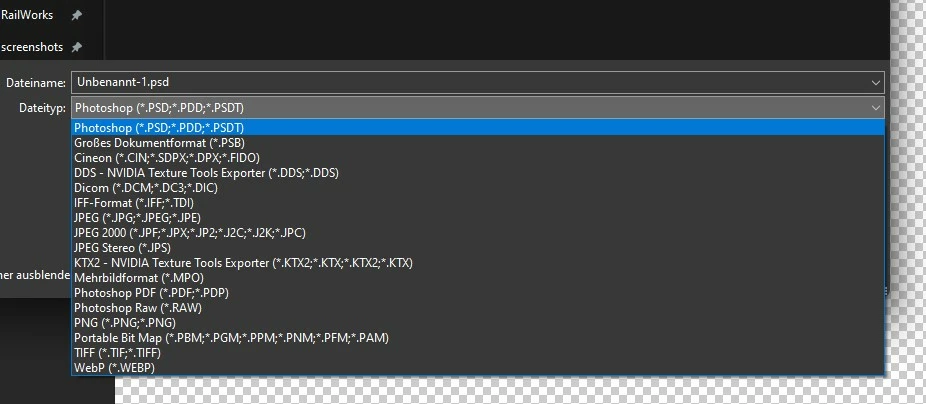
I have a problem, for 2 weeks I can no longer save as TGA in Photoshop, 3 weeks ago this was also the case, then I pressed "save a copy as", then it worked, but now it's gone there too, my friend still has it under “save a copy as” but it doesn’t for me, does anyone know why that is?
 

Correct answer Stephen Marsh

Is the file 8 bpc? Does it have floating layer/s?

1 reply

Stephen Marsh
Community Expert
Community Expert
December 13, 2023

For Save As, the current file has to meet the requirement of the file format that you are attempting to save to (layered or flattened, colour mode, bit depth, alpha channels or no alpha channels etc).


Save a Copy (mostly) bypasses this requirement. For Targa, the file needs to be RGB, so check the colour mode (Save a Copy doesn't change colour modes for you).


Do you have "enable legacy save as" selected in your preferences > file handling?

JanekKAuthor
Participant
December 13, 2023

As a color profile I have: RGB working color space (sRGB) and in color mode RGB color, unfortunately it doesn't help. TGA is still not there, the check mark for "Save old" is off, I turned it on briefly and tested it, it didn't help either

Stephen Marsh
Community Expert
Stephen MarshCommunity ExpertCorrect answer
Community Expert
December 14, 2023

Is the file 8 bpc? Does it have floating layer/s?