


Participant
July 26, 2019
Answered

the highlighted layer visibility icon sector

  • July 26, 2019
  • 2 replies
  • 3729 views

Hi:

in layer panel, the highlighted thumbnail row indicates the active layer.

But occasionally, the visibility icon sector of a layer list row is highlighted too. and it can be a different row from the active layer.

What does the highlighted visibility icon sector indicate?

Thanks
This topic has been closed for replies.
Correct answer

Hi

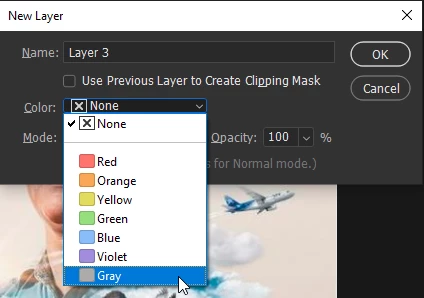
You just added a color to the layers visibility icon, just select None when creating the new layer

2 replies

melissapiccone
Community Expert
Community Expert
July 26, 2019

I don't understand the question, can you post a screenshot of your layers panel showing what you mean?

Melissa Piccone | Adobe Trainer | Online Courses Author | Fine Artist
Participant
July 26, 2019

Thanks for the responses.

It is Photoshop CC 20.0.4 release.

Here is a screen shot. layer 4 was created by layer -> new -> layer. You can see that the visibility icon sector of that row is highlighted. That sector remain highlighted, even after I select a different layer.

Correct answer
July 26, 2019

Hi

You just added a color to the layers visibility icon, just select None when creating the new layer

Sahil.Chawla
Adobe Employee
Adobe Employee
July 26, 2019

Hi Phillip,

That does not sound like a typical Photoshop experience, let's make it right.

Could you please let us know the version of Photoshop you're working with?

Also, please try resetting the preferences of Photoshop and let us know how it goes?

Preferences in Photoshop

Note: Make sure that you back up all your custom presets, brushes and actions before restoring Photoshop's preferences. Migrate presets, actions, and settings

Regards,
Sahil