
AndreHQ
Participant
September 6, 2026
Question

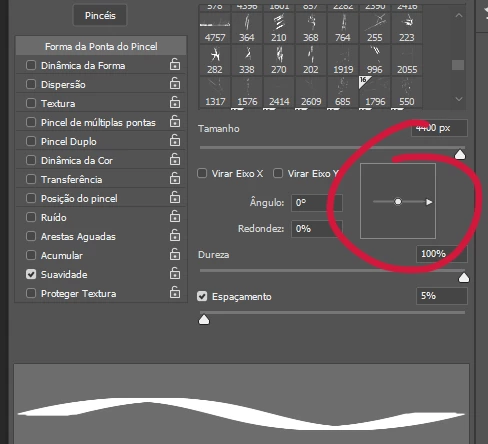
The recent Photoshop Beta (27.11) update introduced a bug that affected my brushes. When I try to use them, they appear flattened, and I have to adjust them in the Brushes panel. Has anyone else experienced this or have any suggestions? Thanks.
  • September 6, 2026
  • 4 replies
  • 19 views

The area marked in red shows the problem with flattened brushes.

    4 replies

    Trevor.Dennis
    Community Expert
    Community Expert
    September 6, 2026

    Andre FYI if you want to keep on using the current Beta version, then I am able to do so by resetting the tool.  So far, the same thing is happening with both brush and eraser, so there’s a good chance that it will happen with other tools that use the cursor.


    If I find resetting is getting too annoying I’ll create a wee Action and trigger it with an unmodified Function key.

    Trevor.Dennis
    Community Expert
    Community Expert
    September 6, 2026

    Yep, it’s a known issue.  It sounds like a an update with the fix is imminent.

    Brush Roundness changes when switching presets in Photoshop Beta | Community

    jane-e
    Community Expert
    Community Expert
    September 6, 2026

    @AndreHQ 

    The forum for Beta is separate from Photoshop. If staff does not move your post, please repost to the Photoshop Beta forum: 

    https://community.adobe.com/photoshop-beta-697

    Jane

    Trevor.Dennis
    Community Expert
    Community Expert
    September 6, 2026

    @jane-e ​@AndreHQ  I think I might be seeing the same thing, and I always use the beta version.  The thing is I set up a Xencelabs Pen Display a couple of days ago, and I was assuming it was an issue with that.

    Andre I’ll check the beta forum, and if there is nothing there I’ll start a new thread.