
Inspiring
November 7, 2023
解決済み

the removal tool no longer works. on Photoshop version 25.1 of PS on Mac OS Monterey

  • November 7, 2023
  • 返信数 4.
  • 344 ビュー

Bonjour depuis la version 25.1 de PS sur Mac OS Monterey l'outil suppression ne fonctionne plus. Je sélectionne la partie à supprimer, mais le résultat est un masque opaque à la place . Sur ordi bureau et MacBook ça fait pareil

 

このトピックへの返信は締め切られました。
解決に役立った回答 Kevin Stohlmeyer

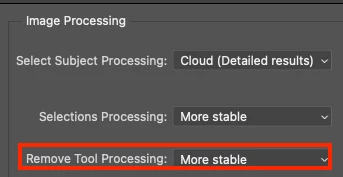
@DUCHENE268300793fbf go to Settings>Image Processing and change your Remove Tool Processing to "More Stable"


返信数 4

Inspiring
November 8, 2023
Thanks a lot Kevin Stohlmeyer, this was the solution !!!
Christine
Kevin Stohlmeyer
Community Expert
Community Expert
November 7, 2023

@DUCHENE268300793fbf go to Settings>Image Processing and change your Remove Tool Processing to "More Stable"


Inspiring
November 7, 2023
Thanks, but resetting did non change anything. Everything was ok with PS 25.0, bug only arrived when updating to 25.1. On both, MacBook and Mac studio
Christine
Jeff Arola
Community Expert
Community Expert
November 7, 2023

I have a 2012 MacBook Pro with photoshop 2024 (ps ver 25.1) running under macOS Monterey 12.7.1

and don't have that issue.


Perhaps a resetting of the photoshop preferences will work:

https://helpx.adobe.com/fr/photoshop/using/preferences.html