Known Participant
April 21, 2025
Answered

there's a lightbulb icon that keeps giving tips even when photoshop is in the background

  • April 21, 2025
  • 2 replies
  • 297 views

it floats above all windows even if photoshop is hidden, how do i kill this feature dead, it brings up the discovery panel if you click it,

can't see any new settings to deal with this new annoyance


macos  15.4.1 photoshop 26.5.0

Correct answer Ged_Traynor

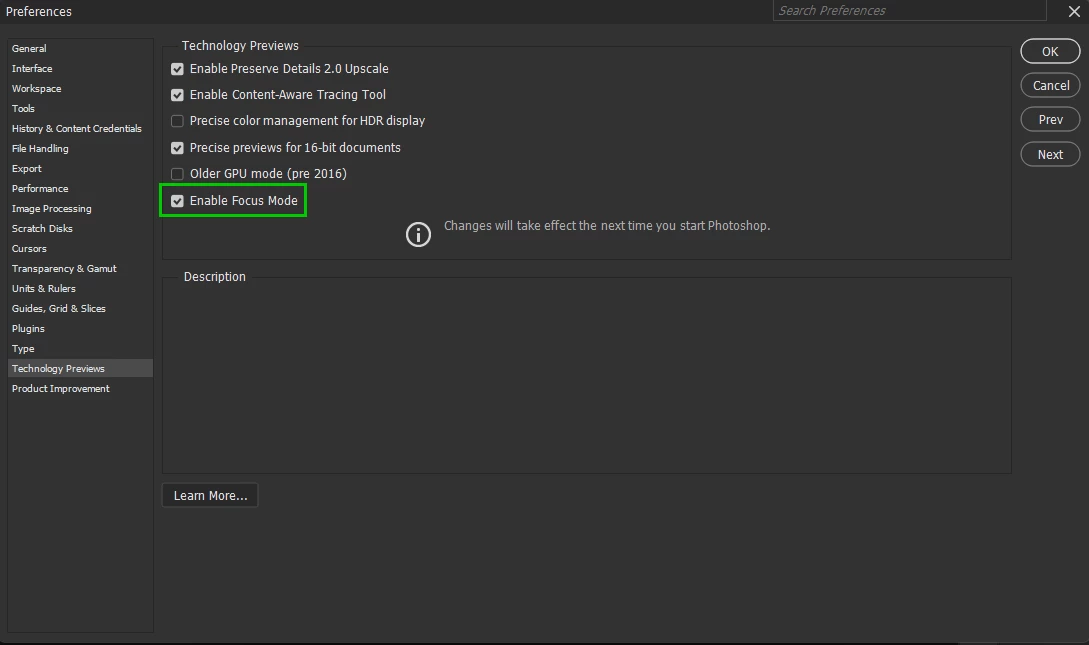
@davisdont enable this option in preferences and restart Photoshop to see if it helps

2 replies

davisdontAuthor
Known Participant
April 21, 2025

thank you- i'll try that!

Ged_Traynor
Community Expert
Ged_TraynorCommunity ExpertCorrect answer
Community Expert
April 21, 2025

@davisdont enable this option in preferences and restart Photoshop to see if it helps

Participating Frequently
November 6, 2025

I have this problem too but don't have that option on my photoshop?


The glow highlight is really annoying and is displayed over all windows even when photoshop is hidden. 

D Fosse
Community Expert
Community Expert
November 6, 2025

@Crayonbox_Creative 

It's not under Tech Previews, it's under Notifications.