


TIFF file sizes suddenly exceeding 4gb limit, forcing to save as PSB, despite no change in workflow
Hi all, I've spent the past hour or so looking for similat topics, posted in the past year, with no luck. Hopefully this is an easy issue:
- Workflow is to right click --> edit in PS 202x from within LR 202x catalogue
- A series of adjustment layers (5-10) in PS 202x
- "save", which defaults to the filetype that LR 202x created initially - this was, and always has been (for me) a TIFF file
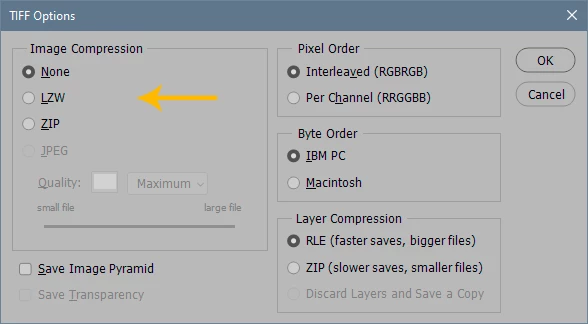
There seems to be an issue with this worfklow all of a sudden (in the past 3 months) wherein I'm unable to save as a TIFF from within PS2023 because it exceeds the 4gb limit. The only workaround I've found is to use the "save as" dialogue box and change the layer compression option from RLE to ZIP. Doing so reduces the filesize and allows me to continue using a TIFF format.
For example, here's a comparison of two files edited with the same workflow:
File #1
- 1 smart object, with ACR
- 8 adjustment layers, each with different masks
- 8 channels created for light / mid / dark tonal ranges
- Edited in PS in August of 2022
- File size 2.04gb, TIFF
- Image size is 6708 x 4471, 300 ppi
- Original file size 64mb
- When I re-open this file "as original" in PS (from LR), I'm able to continue saving it as a TIFF
File #2
- 1 smart object, no adjustments (testing purposes)
- 11 adjustment layers, each with different masks
- 8 channels created for light / mid / dark tonal ranges
- Edited in PS in February of 2023
- File size 4.5gb, PSB
- Image size is 8220x 4624, 300 ppi
- Original file size 64mb
- I can save as a TIFF if I change the layer compression to ZIP. New TIFF file size becomes 2.4gb
My worfklow didn't change (I never had to "save as" before to get TIFF to work), so I'm very confused why I'm all of a sudden dealing with files 2x the size. I don't necessarily care what format, but I don't want to start bloating up my drives with PSB files for no reason
 AdChoices