

Daniel_s_Design
Known Participant
Aug 2, 2019 11:51 AM UTC
Answered

Tilt-shift of the Blur gallery doesn't show me the adjustable lines

Hi, I'm stuck in PS, I don't see any adjustable lines of the TILT-SHIFT(blur). How can I get those adjustable lines back?

Here is a clear example below(See there are no lines to adjust).
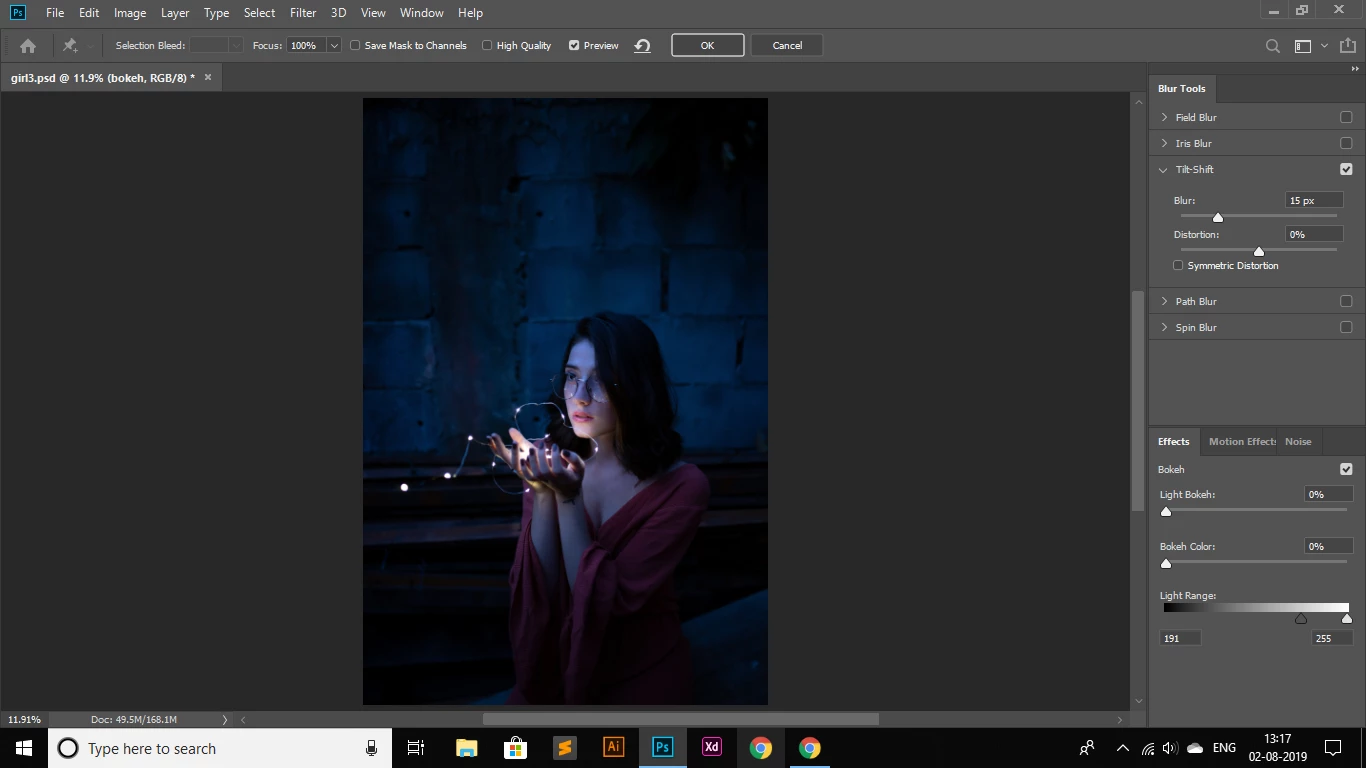
Thanks

    c.pfaffenbichler
    c.pfaffenbichlerCorrect answer
    Community Expert
    Aug 2, 2019 12:39 PM UTC

    View > Show > Edit Pins might be another one.

    11 replies

    Participant
    Feb 25, 2020 7:51 PM UTC

    I've clicked the Edit Pins and I still do not see the bars.

    Translate
    c.pfaffenbichler
    Community Expert
    Community Expert
    Feb 10, 2021 12:26 PM UTC

    Please post meaningful screenshots. 

    Translate
    c.pfaffenbichler
    Community Expert
    c.pfaffenbichlerCommunity ExpertCorrect answer
    Community Expert
    Aug 2, 2019 12:39 PM UTC

    View > Show > Edit Pins might be another one.

    Translate
    franzv19091434
    Participant
    Mar 25, 2023 3:46 AM UTC

    Thank you, this worked for me


    Translate
    Mohammad.Harb
    Community Expert
    Community Expert
    Aug 2, 2019 12:11 PM UTC

    Press ctrl + H

    Translate
    Aug 2, 2019 12:15 PM UTC

    Forgot about that option

    Translate
    Aug 2, 2019 12:00 PM UTC

    Hi

    Try resetting you Photoshop preferences, you may want to backup your settings first

    Migrate presets, actions, and settings

    Translate