Participant
December 16, 2025
Answered

Topaz Gigapixel for Generative Upscale giving error message: We have encountered an issue...

As of 1:00 PM PST today.


Topaz Gigapixel for Generative Upscale giving an error message: "We have encountered an issue and cannot complete your request at this time. Please try again. 


I'm running lattest version of PS 2026 27.1.0. I've tried signing out of Cretive Cloud signing back in, restarting both PS and my computer, also cleared using Edit-Purge-Clear All Cache.


I only get this error message when trying to use the new "Topaz Gigapixel" upscaling. This feature was working just fine earlier today. I can still use the "Firefly Upscaler" at both 2x and 4x. I'm testing this feature for my company and need to get this fixed asap. Any help fixing this asap would be much appricated.  

justlearnskills
justlearnskillsCorrect answer
Community Expert
December 17, 2025

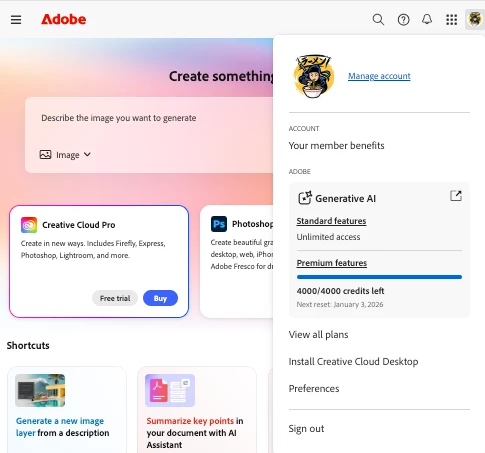
@gary_3708 do you have enough credits? When you run out, Firefly as of a recent update on December 16th, if you hit your limit, the tools simply break. There is no "free/slow" version anymore for standard users. You are either paying for "Pro" or you are locked out.  Topaz likely does a hard-stop with that exact "cannot complete your request" error like yours! Check your credit balance at account.adobe.com or within the Creative Cloud app. 

https://helpx.adobe.com/creative-cloud/apps/generative-ai/generative-credits-faq.html

870182i19E885075EF47C5F.png


m

3 replies

Participant
October 12, 2026

i been facing same issue from last 2 days even after having an enough credit 
It showing error message?? 

Translate
Srishti Bali
Community Manager
Community Manager
October 12, 2026

Hi ​@Cheerful_grace6e5c 

Thanks for reaching out! I would request you to please try the following troubleshooting steps:

  1. Sign Out and Sign Back In: Open the Adobe Creative Cloud desktop app, click your profile icon, sign out, and then sign back in.
  1. Disable VPN or Proxy: Temporarily disable any active VPN, proxy, or firewall software that might be blocking Photoshop's connection to Adobe's AI services.
  1. Allow Photoshop Through the Firewall: If that works, ensure that Photoshop is added to your Windows or macOS firewall's list of allowed applications.
  1. Reset Photoshop Preferences: If none of the above steps resolve the issue, back up your existing preferences and manually rename or move the relevant preference folders to a safe location. This will allow Photoshop to create fresh preference files when it restarts. For detailed instructions, please refer to Adobe's official guide: https://helpx.adobe.com/photoshop/desktop/get-started/settings-and-preferences/backup-and-restore-preferences.html


Please try these steps and let me know whether the issue is resolved. I'll be happy to assist you further if the problem persists.

Translate
Thanks, Srishti Bali | Community & Engagement Strategist, Digital Imaging | Adobe
justlearnskills
Community Expert
justlearnskillsCommunity ExpertCorrect answer
Community Expert
December 17, 2025

@gary_3708 do you have enough credits? When you run out, Firefly as of a recent update on December 16th, if you hit your limit, the tools simply break. There is no "free/slow" version anymore for standard users. You are either paying for "Pro" or you are locked out.  Topaz likely does a hard-stop with that exact "cannot complete your request" error like yours! Check your credit balance at account.adobe.com or within the Creative Cloud app. 

https://helpx.adobe.com/creative-cloud/apps/generative-ai/generative-credits-faq.html

870182i19E885075EF47C5F.png


Translate
m