
Touch gestures: Two finger rotation
Hello,
I have seen a number of posts where users have had the same question. Most responses point to GPU settings in your Preferences or enabling gestures period. These are not the answer to the issue. I use a Cintiq 24, touch enabled, and the two finger rotation features works perfect in every other drawing program, even Adobe's own Fresco. With Photoshop, there is an intentionally programmed 'hold' with the two-finger touch for rotation. See the documentation:
Photoshop Touch capabilities and customizable workspaces
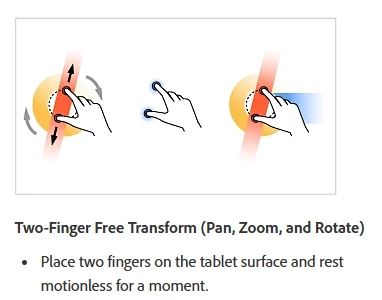
You have to hold the initial two finger touch motionless for a few before rotation becomes active. This is extremely detrimental to a smooth workflow or an efficient drawing experience. You have to wait, resting the two finger touch for about a second before you can continue to navigate the canvas. Might not seem like much, but this adds up over the course of a drawing that has 100's and 1,000's of strokes.
Can anyone suggest how to bypass this 'hold' while still using gestures to rotate the canvas? Is there a simple answer that I just have yet to stumble on? Can Adobe fix this?!
Thanks!


 AdChoices