

Participant
August 12, 2025
Answered

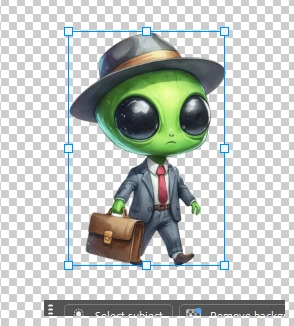
transform control options box

  • August 12, 2025
  • 3 replies
  • 372 views

I am only seeing a small portion of the options box underneath the transform control box. How can I fix this?

Correct answer Francis3671340485a7

Adobe Photoshop Version: 26.8.1 20250624.r.8 5e0d05d x64
Number of Launches: 4
Operating System: Windows 11 64-bit
Version: 11 or greater 10.0.26100.4946


Thanks, I will update and hopefully it will fix the issue. 

3 replies

Glenn 8675309
Legend
August 13, 2025

Ensure the drivers to your video  card are updated.

Jeff Arola
Community Expert
Community Expert
August 13, 2025

What version of Photoshop are you using?


Several users reported the Contextual Task Bar issue was fixed when they updated to Photoshop 26.9.

Francis3671340485a7AuthorCorrect answer
Participant
August 13, 2025

Adobe Photoshop Version: 26.8.1 20250624.r.8 5e0d05d x64
Number of Launches: 4
Operating System: Windows 11 64-bit
Version: 11 or greater 10.0.26100.4946


Thanks, I will update and hopefully it will fix the issue. 

Participant
August 13, 2025

Thanks, the update corrected the problem. 

Glenn 8675309
Legend
August 12, 2025

What happens when you move the box?   

Participant
August 13, 2025
Nothing happens. I can move it but can’t resize it to be able to see the entire thing.


Francis