


Participant
October 24, 2018
Answered

Transform Tool in the latest Photoshop

  • October 24, 2018
  • 14 replies
  • 17327 views

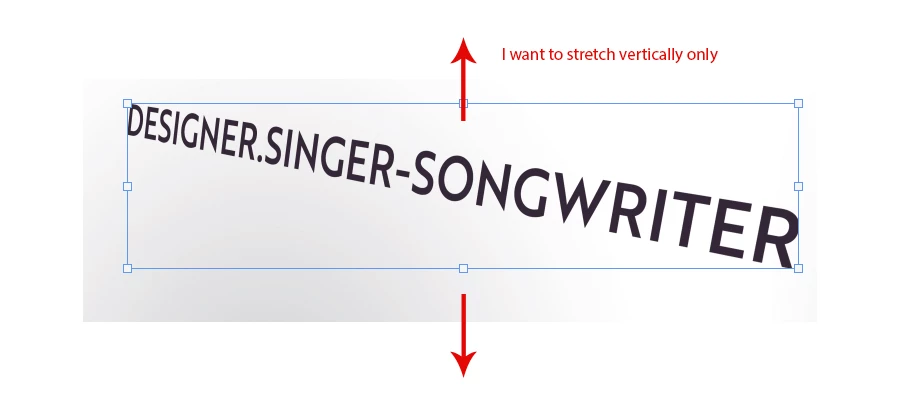
This may be a silly question... but I'm trying to use the free transform tool to stretch an image vertically (with no scale constraints). This is a simple task (which I do all the time) but for some reason it won't let me freely stretch. It's scaling evenly horizontally and vertically (which I don't want to do on this occasion) - I'm not sure if I turned something on or if 'scaling' constraints were automatically turned on... I'm not sure.

Does anyone know how to turn off the automatic scaling on the free transform tool, so I can stretch and distort freely with the transform tool?

This topic has been closed for replies.
Correct answer jane-e

I agree about the video and learning what’s new, but here’s the quick answer to solve your immediate problem. Hold down Shift to distort. The default is proportional unless you change it.

14 replies

KShinabery212
Community Expert
Community Expert
October 24, 2018
Let's connect on LinkedIn. https://www.linkedin.com/in/kshinabery/
jane-e
Community Expert
jane-eCommunity ExpertCorrect answer
Community Expert
October 24, 2018

I agree about the video and learning what’s new, but here’s the quick answer to solve your immediate problem. Hold down Shift to distort. The default is proportional unless you change it.

c.pfaffenbichler
Community Expert
Community Expert
October 24, 2018

Also you may want to peruse the »What’s New« section of the documentation when you install a new Adobe program version.

lambiloon
Community Expert
Community Expert
October 24, 2018

Hi please check following video for new features of new Photoshop....thanks.

Ali Sajjad / Graphic Design Trainer / Freelancer / Adobe Certified Professional