

xenis
Participant
June 1, 2026
Answered

Trapezoid to rectangle with same height

  • June 1, 2026
  • 4 replies
  • 54 views

Hello,

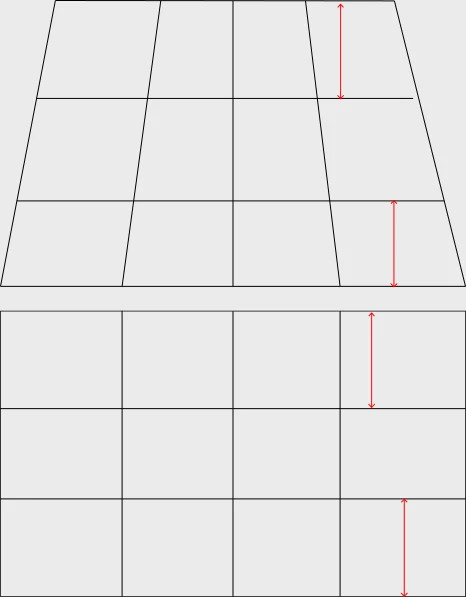
I’d like to “fix the perspective” of an image as follows:

From the top trapezoid to the bottom rectangle. The key is for the width of the parallels to be maintained between the two perspectives. In other words, I’d like to adjust the vertical lines only. Not the horizontal ones. Thank you!


    Correct answer c.pfaffenbichler

    You can convert the image to a Smart Object and try Photoshop’s Warp (Edit > Transform Warp > Custom). 

    4 replies

    c.pfaffenbichler
    Community Expert
    Community Expert
    June 1, 2026

    Do I understand correctly the a plain perspectival transformation is not what you are after? 


    If so then I repeat my recommendation of using Illustrator’s Envelope Distort. 

    It will likely take a lot of finagling and may not fully meet your expectations, though. 


    xenis
    xenisAuthor
    Participant
    June 1, 2026

    The photo I’m working with is too severely distorted it seems.
    I think this would work … but the script’s not available anymore.


    c.pfaffenbichler
    Community Expert
    Community Expert
    June 1, 2026

    I think that Script would perform a »normal« perspectival transformation, which could don’t want, if I understand correctly.  

    xenis
    xenisAuthor
    Participant
    June 1, 2026

    Possibly. But I can’t find the script anyway.

    The issue is that the keystone effect on the picture I’m working with is very severe. So even when I use Photoshop’ Lens correction tool (to only adjust the verticals), I can’t go as far as I need to straighten those verticals. Same with Capture One.

    c.pfaffenbichler
    Community Expert
    Community Expert
    June 1, 2026

    May I ask what then point of the exercise is? 

    Is your starting point pixel data or possibly vector data? 

    xenis
    xenisAuthor
    Participant
    June 1, 2026

    Thanks for asking. I should have mentioned that I’m working from pixels -- a photo of a very old map. I wish I was dealing with vectors.


    c.pfaffenbichler
    Community Expert
    Community Expert
    June 1, 2026

    You may want to try Illustrator – its Envelope Distort might be helpful in this case. 


    xenis
    xenisAuthor
    Participant
    June 1, 2026

    Looks neat. Thank you.
    However …
    Since I’m working from a photo, I thought that Photoshop could do it.