Trouble switching between Clone Stamp and other tools
Hi Everyone,
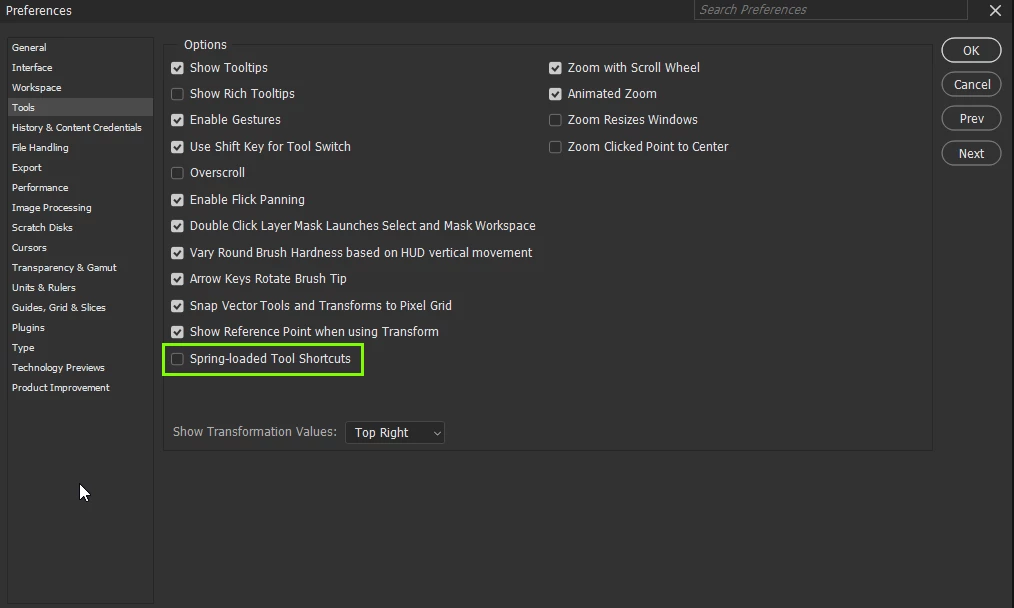
A quick question about something that's been incredibly frustrating for a while now. I've come an issue where the Clone Stamp Tool won't stay selected and keeps bouncing back to the previous tool. I.e If I'm using the stamp and press B, for example, it'll switch over to brush for a moment before springing back to the stamp. This will happen a few times before it finally sticks on the brush. It also happens the other way around, so when I'm using the brush and press S, it'll switch over to the clone stamp before flipping back to the brush. Again, it'll take a few presses of the S key before it sticks on the stamp. It's the same issue when switching to or from the clone stamp to other tools.
Might anyone be having the same issue or know a fix? I seem to be the only one! Thanks! (Currently using version 25.4.0 on MacOS, 14.2.1)
 AdChoices