bellevue scott
Inspiring
Nov 4, 2026 6:58 PM UTC
Answered

Trying to batch save PDF files as JPG

I am trying to batch save hundreds of PDF files as JPG. I created an action where I open a PDF file, and save as JPG, then close the PDF file without saving it. Simple. But when I run the automation it opens the PDF, never saves the JPG, then doesn’t close the PDF. There is apparently no way to batch close hundreds of files in PS, so I have to force quit. 

If I look at the action, there’s clearly a Open, Save and Close function. Using the “Save As dialogue in the automation window doesn’t change anything. Same thing. PS opens the PDF, starts batch opening all 300 images, then does nothing. 

How can I accomplish this seemingly simple task?
 

    justlearn
    justlearnCorrect answer
    Community Expert
    Nov 6, 2026 5:27 PM UTC

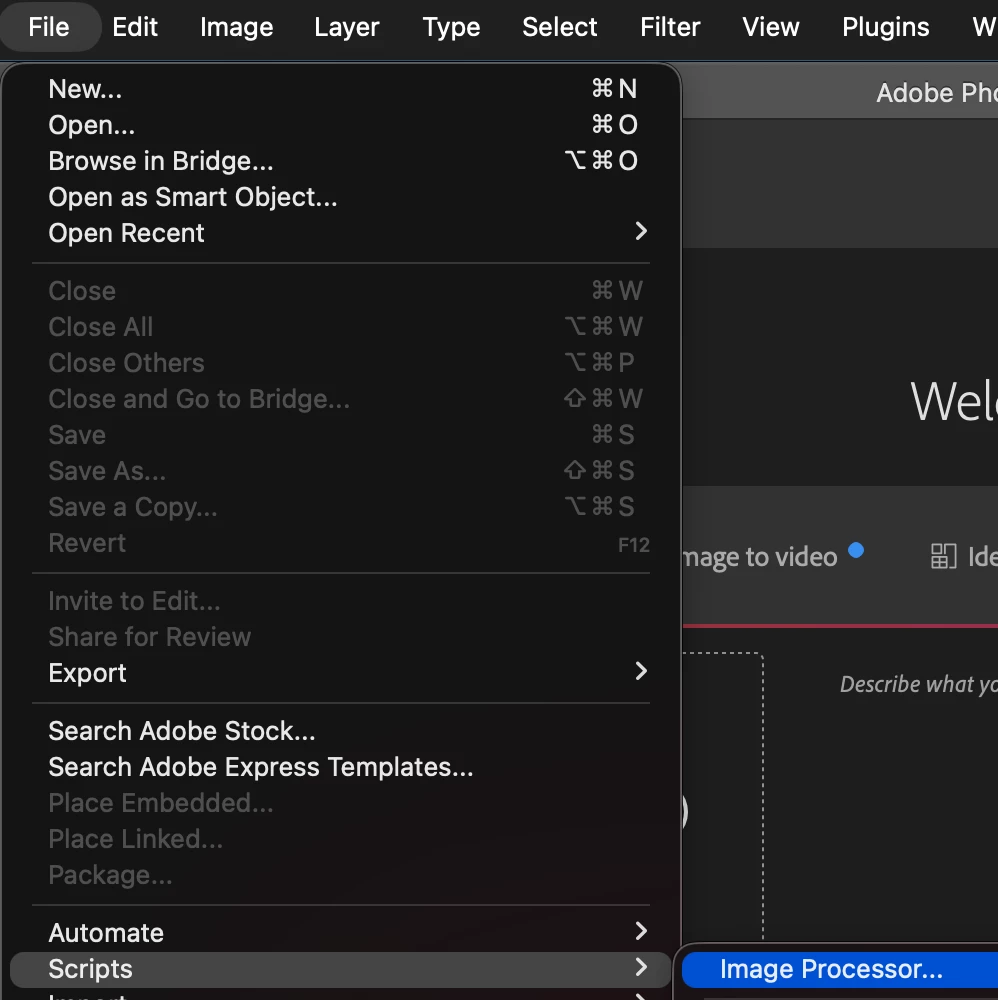
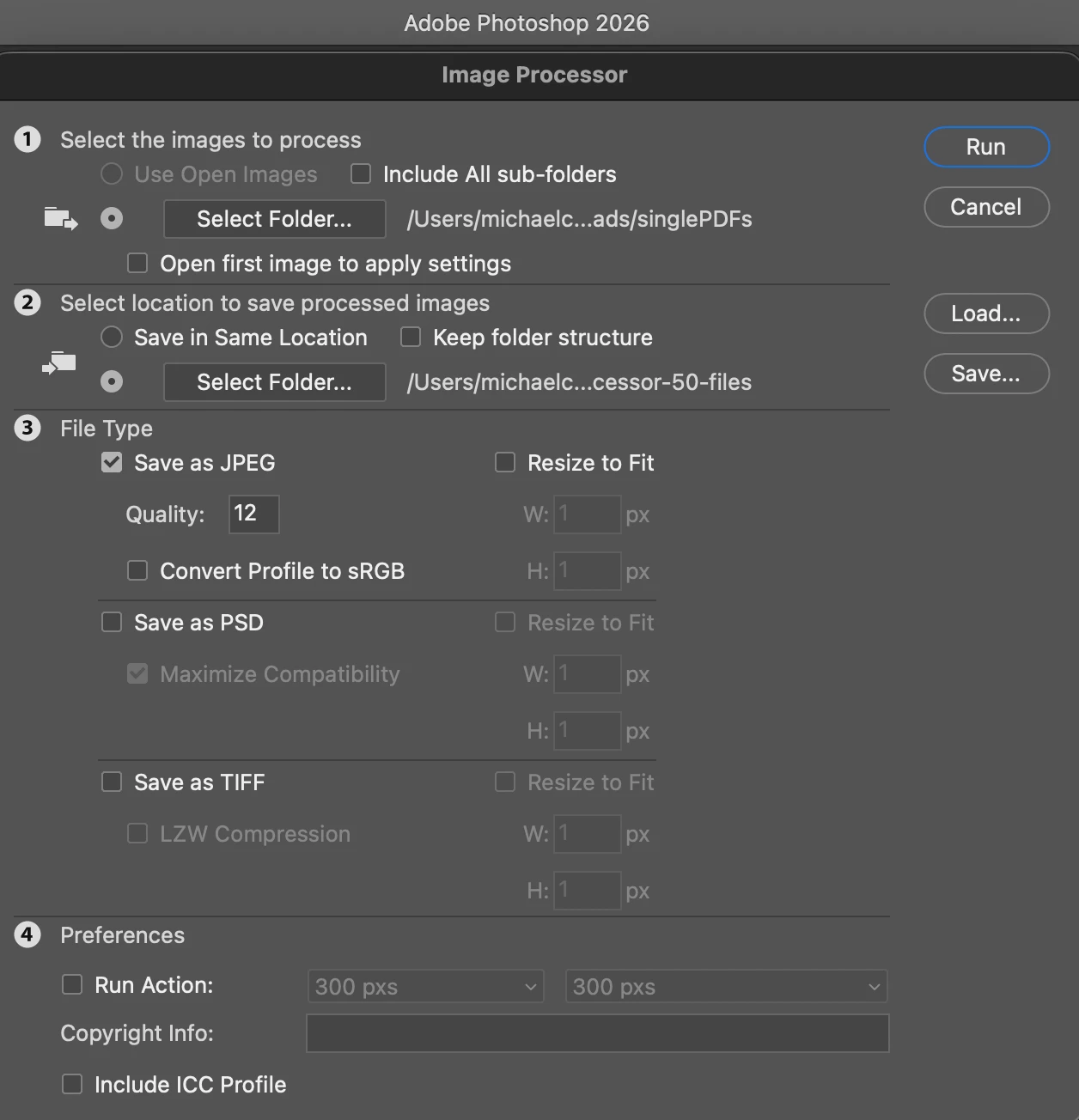
    ​@bellevue scott I found an easier way, and I just tried this on a 50 single page PDFs to Jpegs and it was much easier than Batch. Use Image Processor, File - Scripts - Image Processor


    I  created a folder for the JPEGs to be stored on my desktop to make it easier. 


    Select your source files, and choose where to save the files. Change the Jpeg Quality. If you need high resolution, then use ‘12’ and then hit Run. For 50 files, it took less than a minute — Better than Batch action! 


    m

    12 replies

    justlearn
    Community Expert
    justlearnCommunity ExpertCorrect answer
    Community Expert
    Nov 6, 2026 5:27 PM UTC

    ​@bellevue scott I found an easier way, and I just tried this on a 50 single page PDFs to Jpegs and it was much easier than Batch. Use Image Processor, File - Scripts - Image Processor


    I  created a folder for the JPEGs to be stored on my desktop to make it easier. 


    Select your source files, and choose where to save the files. Change the Jpeg Quality. If you need high resolution, then use ‘12’ and then hit Run. For 50 files, it took less than a minute — Better than Batch action! 


    Translate
    m
    bellevue scott
    Inspiring
    Nov 6, 2026 5:41 PM UTC

    Brilliant! That’s a great workaround. I’m going to have to remember this. I didn’t even know that existed in PS. It’s running like crazy as we speak. I did it on a Mac with 27.11. Thanks so much for this workaround! 

    Translate
    justlearn
    Community Expert
    Community Expert
    Nov 6, 2026 5:49 PM UTC

    ​@bellevue scott I knew there was. a way, because I was showing my students the Action and Batch. Action would work fine on it’s own. Batch was a hit and miss. So, I had remembered this out of the blue, and it’s what I teach all three. 

    Sadly, it doesn’t do multi-page PDFs. I did try, and it gave me a single-page cover (1st page) as an image. Sorry for the run-around. Better late than never I guess! 

    Translate
    m
    Jeff Arola
    Community Expert
    Community Expert
    Nov 6, 2026 4:02 PM UTC

    On the Mac side with Photoshop 2026 (ps ver 27.11) I was able to create a working action to save a pdf to jpg.

    Don’t have access right now to a Windows machine to test, however, you do have Photoshop 27.4, which may have a bug in this regard, so i would update to Photoshop 27.11 and see if that makes any difference.


    Translate
    bellevue scott
    Inspiring
    Nov 6, 2026 4:25 PM UTC

    thanks Jeff. I’ll try on a mac. I have two macs with 27.11, but on one of them (my main editing machine) 27.11 is so sloooowwwwwwww that I’m using PS 26 again. 

    Translate
    justlearn
    Community Expert
    Community Expert
    Nov 6, 2026 9:40 AM UTC

    ​@bellevue scott I think you will have a problem when it comes to a multi-page PDF. I just tried to batch a bunch of PDFs on my local desktop, and it stopped when it got to a multi-page PDF

    Translate
    m
    bellevue scott
    Inspiring
    Nov 6, 2026 3:55 PM UTC

    These are all single page pdf files. Still no answer here on the forums, but it appears to me that actions are broken yet again. Actions are broken Adobe. actions are not recording all the steps and are not functioning properly 

    Translate
    justlearn
    Community Expert
    Community Expert
    Nov 6, 2026 5:31 PM UTC

    ​@bellevue scott see the above for a different way with Image processor. Faster for your slow mac

    Translate
    m
    bellevue scott
    Inspiring
    Nov 4, 2026 7:27 PM UTC

    This is PS 27.4.0 on Windows 11. 

    I’ve also tried creating an action doing a quick save as PNG. But the same issue. I run the batch using the action that I made, and it doesn’t save anything and leaves the file open, despite that fact that in the action there’s a close without save command. 


    Translate
    Srishti Bali
    Community Manager
    Community Manager
    Nov 4, 2026 7:24 PM UTC

    Hi ​@bellevue scott,


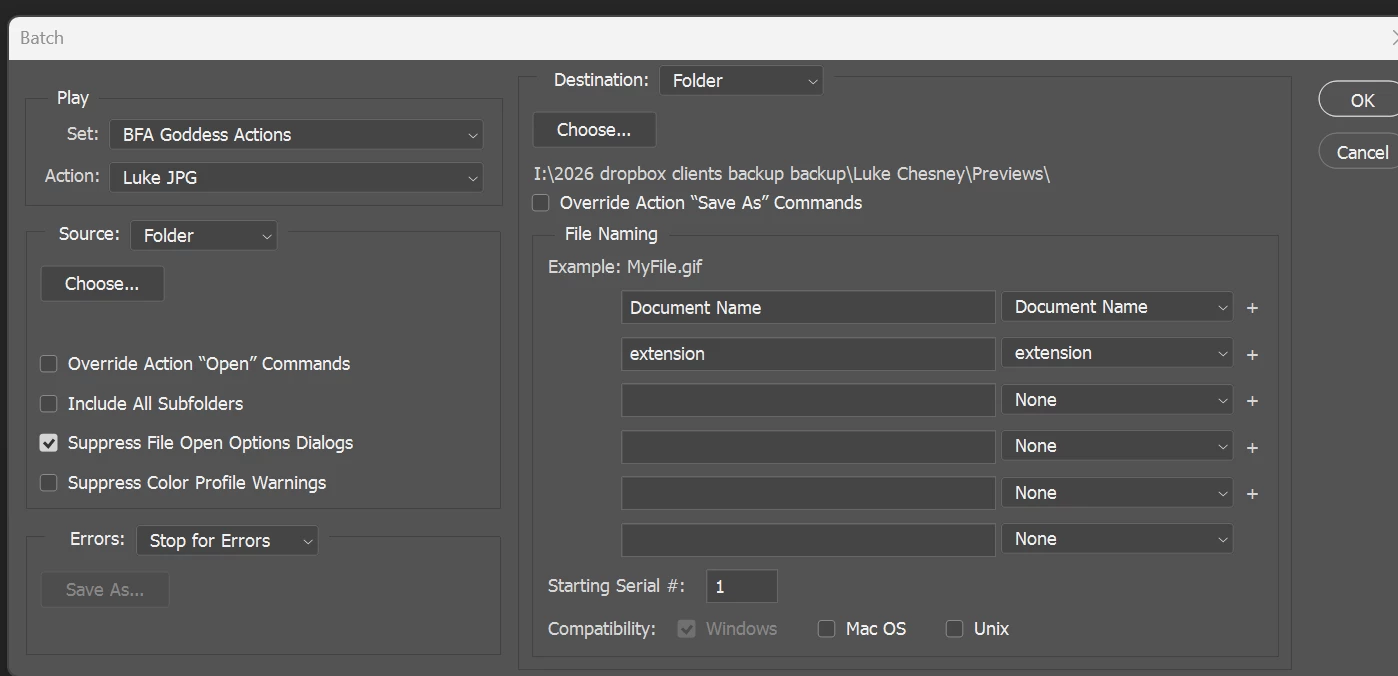
    I noticed that the destination folder in your Batch dialog is a Dropbox location. As a troubleshooting step, please try saving to a local folder.

    Run the batch with just two or three PDFs first, and check whether Photoshop creates the JPGs and closes the documents. This will help determine whether the destination location is contributing to the problem.

    If it still fails, please share:

    • Your Photoshop version and operating system.
    • Whether the PDFs are single-page or multipage.
    • Action file
    Translate
    Thanks, Srishti Bali | Community & Engagement Strategist, Digital Imaging | Adobe
    bellevue scott
    Inspiring
    Nov 4, 2026 7:36 PM UTC

    No, it’s not a dropbox location. It’s a local folder. The local forlder name is “dropblox clients/xxx, but it’s a local folder and has nothing to do with dropbox. 

    I’ve also tried export. Same thing. Doesn’t save. I don’t even see the save or export in the action. It’s not recording it. 

    Windows 11

    PS 27.4.0

    Adobe won’t let me attach an action file. But you can see that the action isn’t saving the save as or export function, and it’s ignoring the close without saving. 


    Translate