
Answered
Turn my grey sky blue using CS6, need simple step by step
Got lost using tutorial that focus on removing things. Need a step by step on how to turn my grey to blue sky. I know the information is out there already but can't find it. gail

Got lost using tutorial that focus on removing things. Need a step by step on how to turn my grey to blue sky. I know the information is out there already but can't find it. gail
Hi Gail
You have replaced the sky with a solid colour. If you look at a real sky it lightens and gets less saturated as you go down to the horizon.
You could use another photograph and mask it so that it replaces the sky or, if you want a clear blue sky, you could do this.
Add a Gradient Fill layer (Layer > New Fill Layer > Gradient) and set the Blending mode to "Darken"
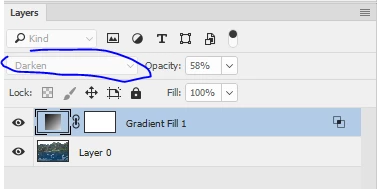
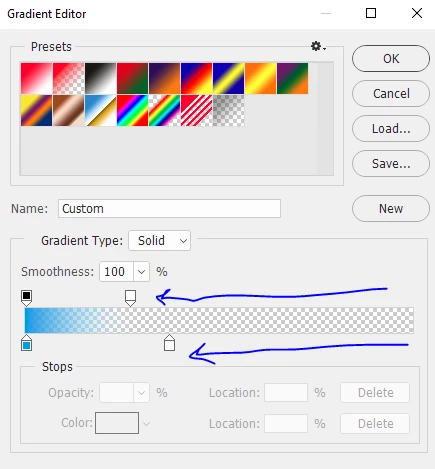
Click on the gradient and adjust it so it goes from blue to white and the opacity reduces as shown.
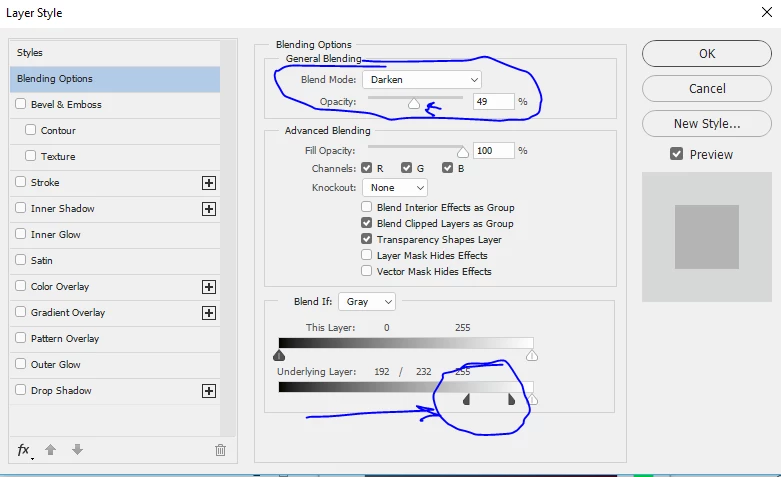
Finally right click on the layer and select Blending Options.
Set "blend if" as shown (you will need to Alt click on the slider to "split it). This will mean it does not touch the mountains and reduce the opacity until it looks right
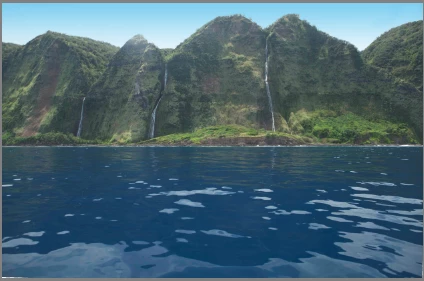
Finally I used crop to straighten the water edge
Dave
Already have an account? Login
Enter your E-mail address. We'll send you an e-mail with instructions to reset your password.
 AdChoices