
Turn off Autosave
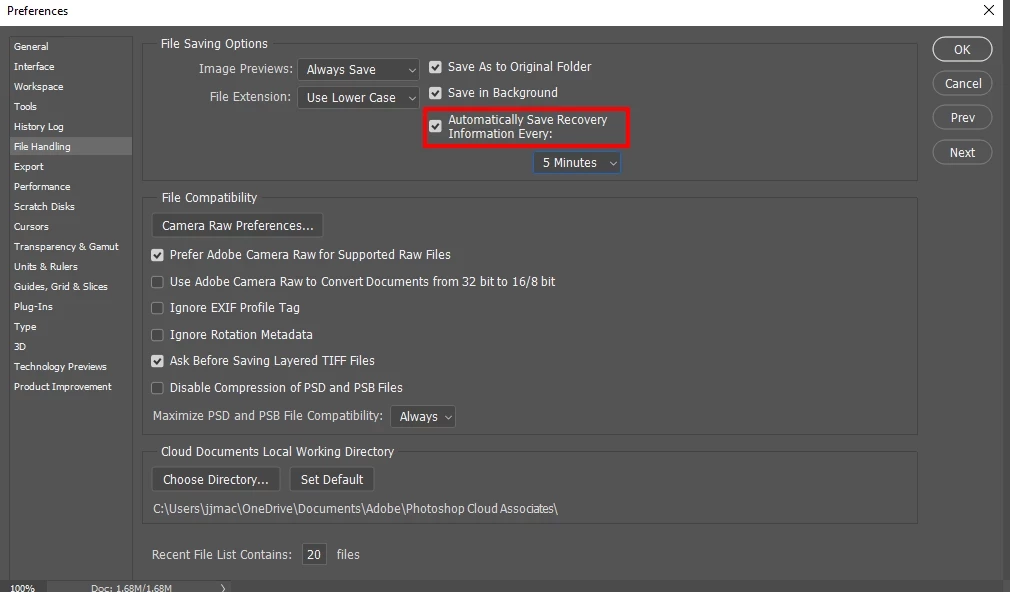
The image here is not from my pc, I found it online to help illustrate my problem.
I do not know Photoshop well at all, I have only recently begun to use it, so I am a beginner.
My problem is that eventhough I have turned off auto-save shown above, it still automatically saves the file I am working on. Perhaps every 15 minutes or so. It slows down my pc tremendously. I want to turn off auto-save. I thought I had, but it still on. I searched online for how to turn off the auto-save and did that and have not changed any other settings. I checked earlier today and the auto-save box is not checked. What is wrong?
Only yesterday I finally found out how to upload a file to the Cloud and did it with this very large file that I am working on. It is currently 10GB.
Before I did that I saved it and opened it on my pc, which is older, and may not be powerful enough for PS, but it has the minimum specifications needed for it. When I worked on the file which I have on the pc, it was slow, but not at all as sloooooooow as it is now with the Cloud file. Even a very simple command takes almost a minute or longer. To my understanding working on a Cloud file would flow much smoother. Working on the Cloud file also slows my pc down and even more while it is auto-saving.
Also yesterday, after I had opened the Cloud file for the first time, it went really smoothly and the difference was quite noticable, as if I was working on another computer, but now, today, it is really testing my patience and it soon goes out the window.
Magnus.


 AdChoices