
Participant
January 20, 2024
Answered

Turn Smart object into layer

  • January 20, 2024
  • 1 reply
  • 601 views

Im having an issue with quickl turning smart object ubto rasterized layer. before if I had a smart object i could just quckly press on it with a brush and press OK and it would turn into a normal layer. very quick and easy. now, when I updated to the most current version and try to paint on it it wont prompt to turn it into normal layer but will instead just automatically create a new layer and paint on that one. now i have to right click on layer and press "convert to layers" which slows down the work by a lot and is overall inconvinient. 

Any way to make as it was before? thank you.
This topic has been closed for replies.
Correct answer Jeff Arola

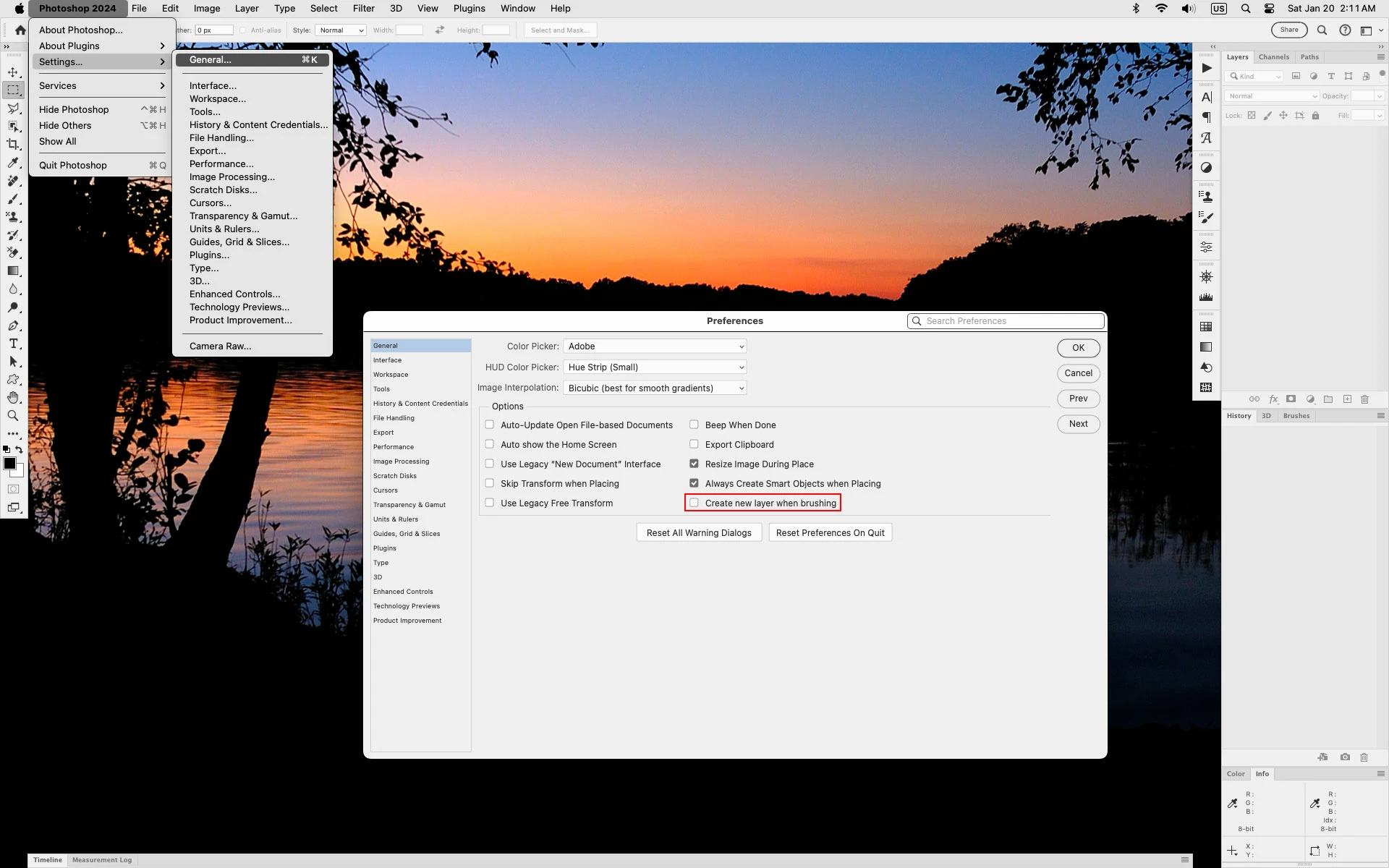
Yes go to Photoshop 2024>Settings (Preferences)>General and uncheck Create new layer when brushing


1 reply

Jeff Arola
Community Expert
Jeff ArolaCommunity ExpertCorrect answer
Community Expert
January 20, 2024

Yes go to Photoshop 2024>Settings (Preferences)>General and uncheck Create new layer when brushing


Participant
January 20, 2024

thank you a ton!

D Fosse
Community Expert
Community Expert
January 20, 2024

You can also use custom keyboard shortcuts.


Mine are ctrl+B to create smart object; shift+ctrl+B to rasterize.