Participant
Mar 1, 2018 4:21 AM UTC
Question

Tutorial question {2207}

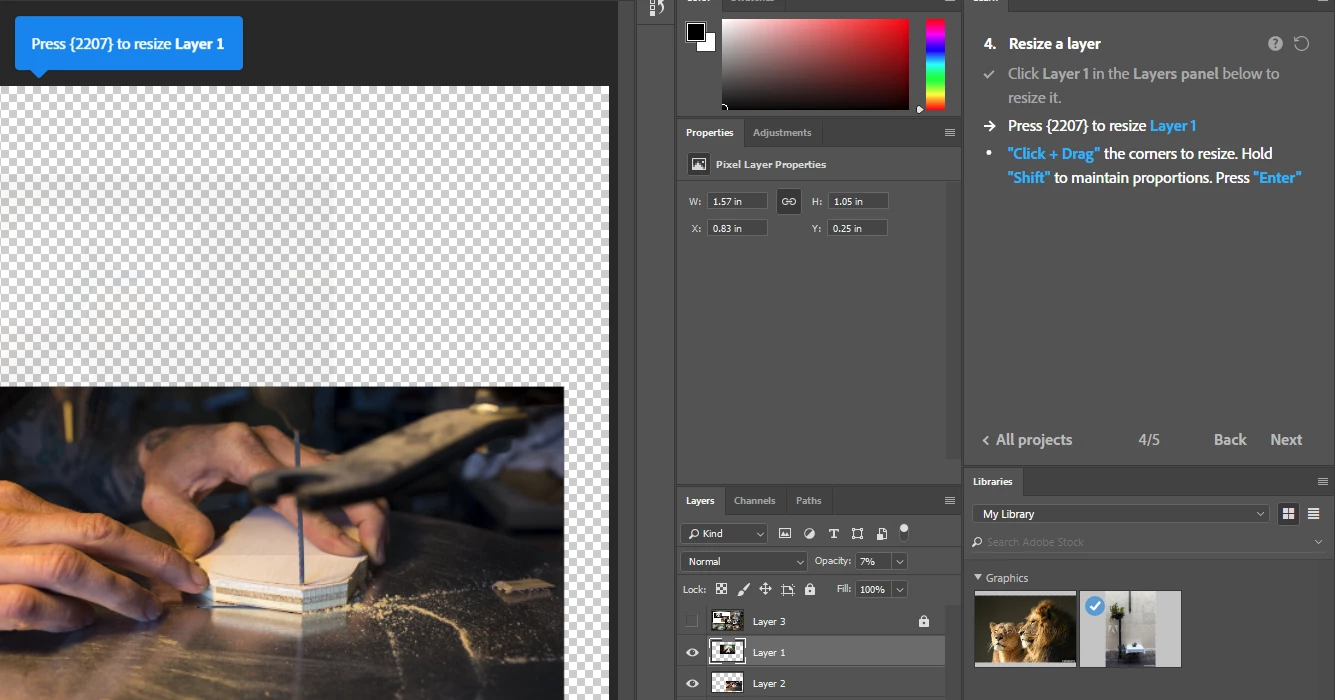
Hey everyone. I'm sure this is a very easy and basic question....I've just purchased all of the Adobe products and I'm trying to learn some of the basics. In the screen cut below it is asking me to resize layer 1 by pressing {2207}............I have no idea what {2207} is and feel like it's an error. I noticed that the program also shows a number when I want to click into the next tutorial it gives me the option of clicking next or {1961}.

Any information would be extremely helpful.
Thank you.

This topic is closed to new replies. Start a new post to keep the conversation going.

22 replies

Participant
Oct 7, 2019 11:05 AM UTC

07/10/2019 Still showing numbers. Still broken.

Translate
Its Renee
Participant
Aug 6, 2019 2:08 AM UTC

8-5-2019

Yep I'm still seeing the numbers too. HaHa I guess we'll just have to let them know

Translate
Participant
Sep 21, 2019 7:30 AM UTC
9-21-2019 Japan / Me too. They still showing numbers. The tutorial is good, without this problem.
Translate
Participant
Jun 13, 2019 4:34 PM UTC

6-13-19 Still showing numbers, thanks for the answers tho should help get through this tutorial.

Translate
Ussnorway7605025
Legend
Nov 22, 2018 1:17 AM UTC

that is the "work with layers" tutorial and it is hopelessly outdated... should have been removed so sorry for wasting your time mate

  • you don't press [shift] to transform proportionally now because Adobe changed that... the exact opposite in fact
  • the sysbols {2207} is code talk for  [ctrl]+ and they are showing up in your tutorials because Adobe language is not correct... I would assume your system is not set to English US default but the steps to fix it will depend on what language you like to use but English International tends to work best for Adobe software

Translate
Participant
May 2, 2019 10:41 PM UTC

5/2/19 Still showing numbers instead of Ctrl + T.

Translate
Norman Sanders
Legend
Mar 1, 2018 3:22 PM UTC

It seems you have gone to Window > Learn and are following instructions in a particular tutorial. Return to that tutorial to find the reference for those numbers. They may refer to more detailed instruction within the tutorial They are not part of the actual Photoshop application.

Translate
Abambo
Community Expert
Community Expert
Mar 1, 2018 5:19 PM UTC

Thanks to Norman, I've now learned how to start that learning feature. :-)

I think they are the code of the key that should be shown.

For some reason the system does not replace the placeholders...

Translate
ABAMBO | Hard- and Software Engineer | Photographer
Abambo
Community Expert
Community Expert
Mar 1, 2018 2:40 PM UTC

Nice problem. The key should be <CTRL/COMMAND> T like transform, but why the numbers are displayed is out of my knowledge.

Translate
ABAMBO | Hard- and Software Engineer | Photographer
Participant
Nov 21, 2018 8:39 PM UTC

Yes, I see that {2207} should be <ctrl> t,  hopefully someone has the action to update this page in the documentation.

Thanks for the correct direction here.

Translate
Participant
Nov 21, 2018 8:46 PM UTC

I got to the next section of the tutorial and now see "Press {1016} to deselect". I'm curious what hot key that translates to?

The image associated with the tutorial at this point looks like Mirror Pond in Yosemite.

Translate