
Participating Frequently
September 14, 2023
Answered

Type tool Not Working _ Very Strange

  • September 14, 2023
  • 1 reply
  • 1232 views

All of sudden the type tool is not crateing a text layer but shapes on a regular layer. When I first try to use the type tool it colors the hole artboard in hot pink color with the text in white. When I exit the command the text is imediettly selected with the marching ants and I have the Generative Fill prompting me to chose how to color the selection. This creates a non editable colored shape based on the outlined text. I have no idea what happened and I pocked around and did google searches and I can't figure it out. Does anyone have any idea of what that is (other than a lot of pain)....

Thank you very much...
This topic has been closed for replies.
Correct answer Ged_Traynor

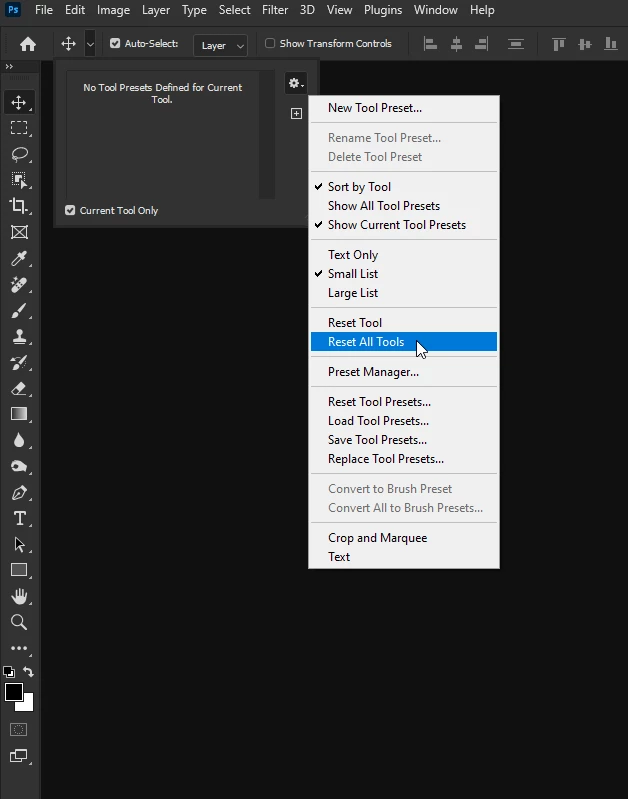
@defaultsst8qc9i6wya first thing to try is resetting the tools

If that doesn't help try manually resetting your Photoshop preferences
https://helpx.adobe.com/ie/photoshop/using/preferences.html#Manually
Remember to backup your settings before doing the preference reset
https://helpx.adobe.com/ie/photoshop/using/preset-migration.html

1 reply

Ged_Traynor
Community Expert
Ged_TraynorCommunity ExpertCorrect answer
Community Expert
September 14, 2023

@defaultsst8qc9i6wya first thing to try is resetting the tools

If that doesn't help try manually resetting your Photoshop preferences
https://helpx.adobe.com/ie/photoshop/using/preferences.html#Manually
Remember to backup your settings before doing the preference reset
https://helpx.adobe.com/ie/photoshop/using/preset-migration.html

Participating Frequently
September 14, 2023

Hi, thanks for providing solutions. I tried the easy steps and didn't help. I am trying to manually rest but when I went into the Adobe folder I have multiple Adobe Photoshop folders 2021 all the way to 2024. The recommendation is to move the Adobe Photoshop [Version] Setting to the desktop. Should I do this only for the latest version 2024? Should I delete the previous (21, 22, 23, 24 ver.) folders? 


Participating Frequently
September 14, 2023

Yes.....manually resetting the preferences helped. Thank you very much!