Feast
Known Participant
January 8, 2018
Answered

UI: Remember last path entered

  • January 8, 2018
  • 1 reply
  • 12274 views

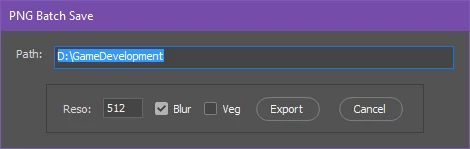
I have a simple UI for my artists that does some modifications to his files then saves it to the folder of his choice.
However it gets quickly tedious to re-enter the path every time he uses the script.

I would like to remember the path he previously entered or use the path that Photoshop uses as a default.
How can that be done?


Here's the script if someone is interested, it allows you to save out your groups as PNG's with possible additional blurred versions:
Photoshop PNG Blur Save - Pastebin.com

Message was edited by: Jeremy Vansnick

This topic has been closed for replies.
Correct answer Kukurykus

Thanks

I realized that upon quitting Photoshop the path is lost, is there nothing I can do about that?


Change beginning of your script to:

PTH = ""; displayDialogs = DialogModes.NO

var Path = $.getenv('pth') || PTH || "d/";

// for saving files

var doc = app.activeDocument;

And in the middle where you last time insterted new part, edit that to:

dlg.show();

$.setenv('pth', Path.slice(1))

if (PTH != ge = $.getenv('pth')) {

     (fle = File($.fileName)).open('r'), jsxFile = fle.read()

     .replace(/"(.*)"(?=;)/, '"' + ge + '"'), fle.close()

     fle.open('w'), fle.write(jsxFile), fle.close()

}

Additionally what is important change two your trim methods from doc.trim(TrimType.TRANSPARENT, true, true, true, true); to just doc.trim(). This way your images will be trimmed whether they are on transparent or one coloured or else coloured background. If you won't do this then your script will stop working (of course in specific situation).

As to beginning and middle of script now when PTH is false, and environment pth is undefined it will display 'd\', however it will happen only once, at first time of running script. During using Ps it will always refer to environmental path. Every time it is changed your .jsx script is going to update itself of new path (first line of code). If you choose few times in a row the same path, then PTH variable will keep last different path, if you change it to other in dialog and click 'Export' button it's going to be changed also in your script, but will be used only at every next Photoshop session.

1 reply

Kukurykus
Legend
January 8, 2018

There are 4 mistakes in code. Actually one four-fold, and honestly two double. Script can't save (at least for me) as far as there is AUTOMATIC set for ResampleMethod. Correctly there should be ResampleMethod.BICUBIC. in all four places

To answer your question:

  • change var Path = "D:\\GameDevelopment"; to var Path = $.getenv('pth') || "d/";
  • and right after dlg.show(); insert another line: $.setenv('pth', Path.slice(1))
Feast
FeastAuthor
Known Participant
January 8, 2018

That's exactly it!

I don't know why but my artist keeps having the popup about trimming with the options despite using BICUBIC like you said.
On my Photoshop, it doesn't ask for that, there is no popup showing during the script. However he has a popup for every time my script calls trimming.

Is this something you're familiar with? Thanks a lot for the help already, it's working great except for the popup.

Kukurykus
Legend
January 8, 2018

Put on top of the script: displayDialogs = DialogModes.NO