
Question
Unable to access Plugins in PS
Hello, very recently my Photoshop has had issues with plugins. Just a week ago, my plugins worked fine, but today I noticed that the plugins dropdown options were all grayed out. I've downloaded plugins from Creative Cloud and receive a notification that they are installed and should be available in Photoshop, but all the options remain gray. Also, when I attempt to download a third-party plugin I get the notification: "failed to install plugin by unifiedplugininstalleragent"
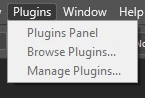
As far as I am aware I have only updated photoshop, but even regressing to previous versions does not help.
Version of Photoshop: 25.11.0
Running Windows 10
Any help would be greatly appreciated.


 AdChoices