


Known Participant
April 21, 2025
Answered

"Unable to execute the command due to a program error" - Photoshop 26.5

  • April 21, 2025
  • 1 reply
  • 1090 views

Hello,

For several months, Photoshop 26.5 has been spamming error messages when I create a gradient, to the point of crashing my software.
Example of the message (translation: "unable to execute the command [...] due to a program error"):
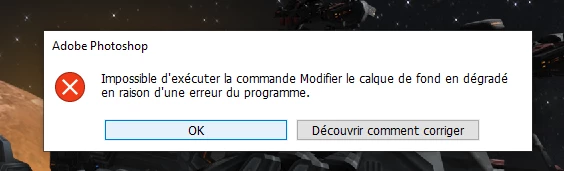

And unchecking "Use Graphics Processor" doesn't change anything.

Correct answer Aleke

Great, thank you very much!! The gradient effect is very popular, it will be useful to many users 🙏


Hi @Nixop! Update 26.6 was just released, can you download and double-check if it fixes the error for you? Thanks! 

Alek

1 reply

Community Manager
April 21, 2025

Hi @Nixop! I'm sorry to hear you've been having issues with creating gradients.

When your app crashes, do you get a crash report dialog? If you do, please click the button to send the report to Adobe so we can check it out in our system. As an initial step, you could try resetting your preferences, which will restore Photoshop to its default state. Just be aware that this will delete your workspaces and brushes if you don't make a backup beforehand. Here's how to do that: https://adobe.ly/42yp2Nr


If that doesn't help, could you please share your System Info? You can find it in Photoshop under Help > System Info. Just copy the info to a text file and attach it to your response, or share it with us through Google Drive, WeTransfer, or another file-sharing platform.

Thanks a bunch! 😊

Alek

*(If you mention me with an @, like @Aleke, I’ll get a notification and can respond faster.)*
NixopAuthor
Known Participant
April 22, 2025

I've already reported this, but I've never received a response.

Note: this error occurs on two different computers (desktop and laptop).

[Moderator's note: To keep the thread readable, system info has been moved to a text file.]

________________________Graphic designer freelance & Artistic Director
NixopAuthor
Known Participant
April 22, 2025

@Aleke Update: I use the "Adjustment Layer" a lot to add a gradient. And I just noticed that the error message (and crash) appears when I only keep one "gradient stop" color.

________________________Graphic designer freelance & Artistic Director