



Unable to Import Brushes From Libraries Window to Brushes Window
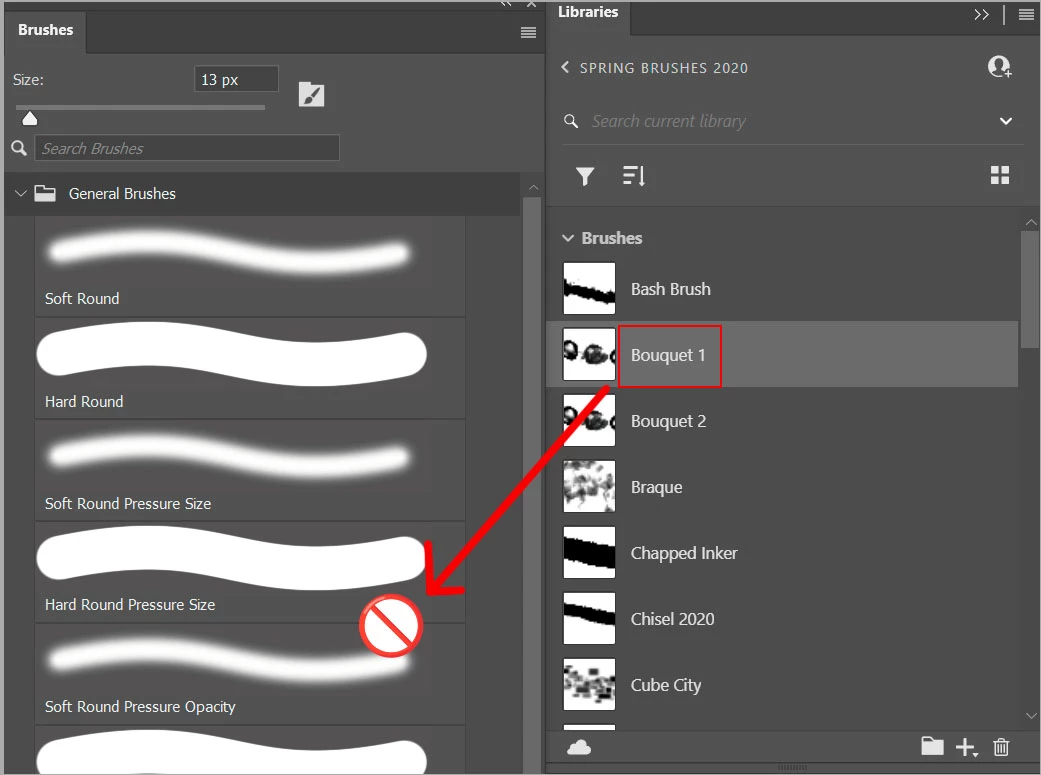
I recently formatted my computer and I wanted to bring brushes from the library window to the brushes window so that I could use brushes locally without having to load them up on the cloud.
Previously, you were able to drag them from one window to the other window and they would import.
However, now when I try to do that I get the prohibited sign like the image above.
I am able to drag from the brushes to the library but not the reverse for some reason. Is this a bug or something that is not possible any more?
I searched elsewhere on this topic and found no solution.
And before the suggestion to, save each individual brush from the library as it's own brush in photoshop that is not a feasible solution. Way too much work to put in as a substitute for something that should be working already.
Thank you.
I'm using the latest version of creative cloud, 6.8.0.821 and photoshop 27.0
Windows 11 Pro 10.0.26200
 AdChoices