Participant
April 2, 2025
Answered

Unable to open files from Lightroom to latest version (26.5) of Photoshop

  • April 2, 2025
  • 2 replies
  • 202 views

I updated both Photoshop (version 26.5) and Photoshop Beta (version 26.6) to the latest versions yesterday on my Mac (running Sequoia OS 15.3.2), and now I'm unable to open files from Lightroom (version 8.2, cloud version) in Photoshop. I've tried multiple times, and while the Photoshop app opens, the file doesn't export to either the standard or beta versions of Photoshop. Have you encountered similar issues? Is there a Lightroom update expected soon? I’d prefer to avoid having to uninstall and reinstall the programs if possible. 

Correct answer Ged_Traynor

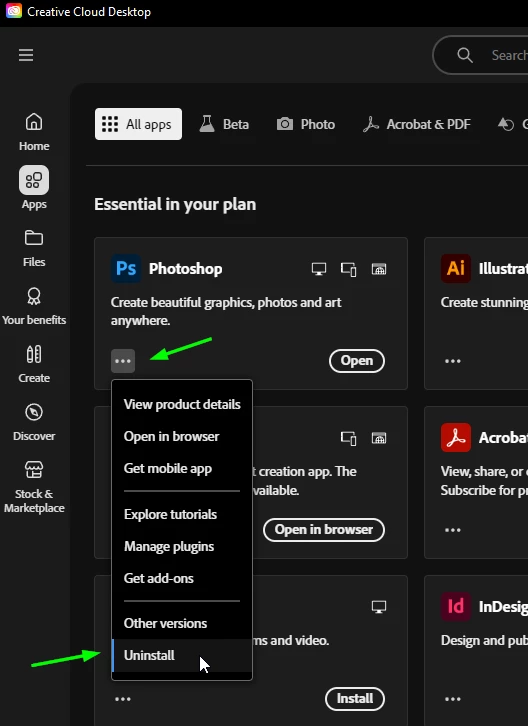
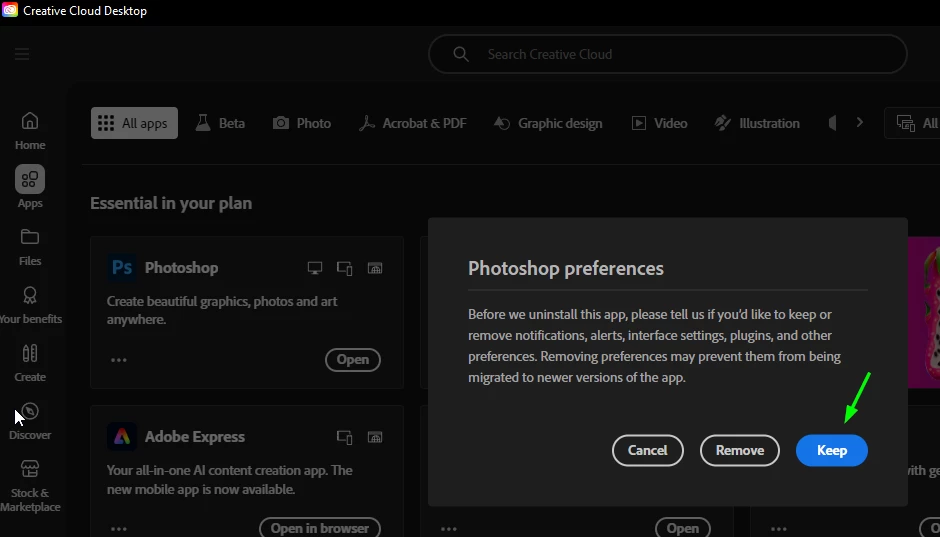
@Danemos try uninstalling Photoshop from the CC app, select to keep preferences and then reinstall Photoshop again


2 replies

DanemosAuthor
Participant
April 2, 2025

Perfect! This solution worked. Thank you very much!

MEZPHOTOGRAPHIE
Participating Frequently
April 5, 2025

Thank you so much, had the exact same problem and it was getting urgent for me to fix it, (on a PC with the Beta version)

Ged_Traynor
Community Expert
Ged_TraynorCommunity ExpertCorrect answer
Community Expert
April 2, 2025

@Danemos try uninstalling Photoshop from the CC app, select to keep preferences and then reinstall Photoshop again