Participant
March 4, 2021
Answered

Unable to open Photoshop 2020 : Photoshop was unable to parse the PostScript

  • March 4, 2021
  • 6 replies
  • 44949 views

I can not open Photoshop 2020.  When I try to open it, it reads: Could not complete your request becaue Photoshop was unable to parse the PostScript.  I was on it not 10 minutes before I had to close it out, went back on, and now this message shows up... UGH! HELP!


{Thread title edited by moderator}
This topic has been closed for replies.
Correct answer Glenn 8675309

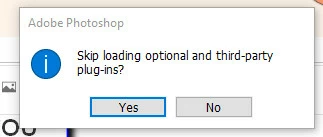
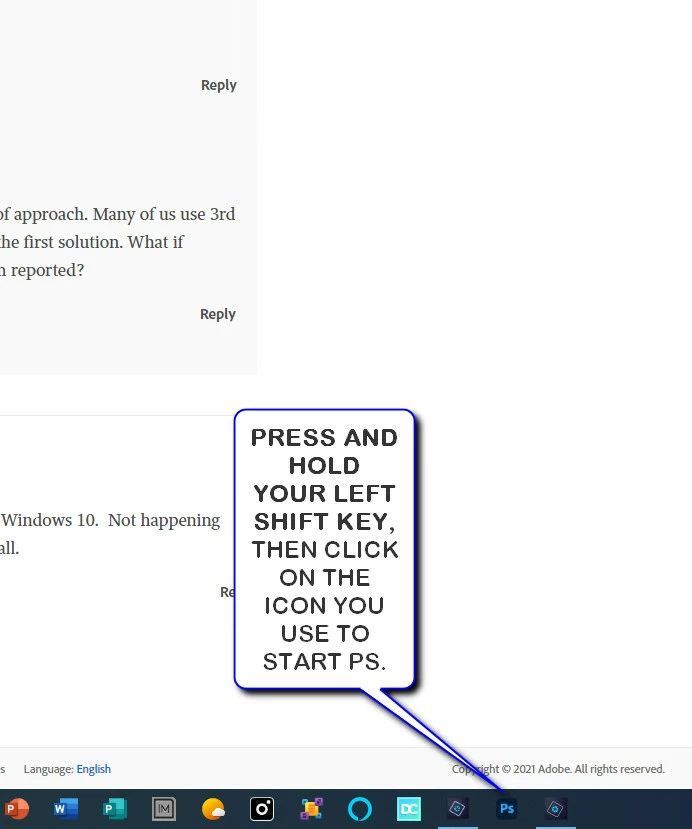
THIS IS A TROUBLSHOOTING THING YOU MAY WANNA TRY:


6 replies

Participating Frequently
May 26, 2024

Having this issue with Photoshop 2021 on Mac.

Participant
April 19, 2021

Having the same problem here. Photoshop won't start and gives an error message about being unable to parse a PostScript file, when trying to run the program from the start menu without asking to open a specific file.

Left shift click and running as administrator did not work for me.


Just for reference, I found another solution:

https://medium.com/@sumona7chatterjee/fix-could-not-complete-your-request-because-of-a-problem-parsing-the-jpeg-data-d201fcf760f1


The article is about PhotoShop CC 2018, but it worked in my case (22.3.0 release in 2021):


- Start the registry editor (Windows+R: RegEdit)

- Browse to 'Computer\HKEY_CURRENT_USER\Software\Adobe\Photoshop\x', with x being the highest version number, I suppose (150.0 in my case)

- Right click on the white window space and select New / DWORD (32-bit) Value

- Double click the newly created value and assign it a value of 4000 (hexadecimal)

- Close all programs and restart the computer

- Try running Photoshop again


This worked for me, but cannot promise it will for anyone.

It seems the nature of the problem may be memory related?

Or is it the scratch disk?


It would be great if an Adobe expert could chime in and elaborate on this.

Known Participant
May 8, 2021

Thank you for this. It is beyond my computer ability to have to program a computer. I am going to get an Adobe agent to completely remove and reinstall Photoshop yet again. It keeps resetting itself and when I post in the forums, there is no solution. I am tired of these constant issues with this app!

Participant
April 13, 2021

I just had the same issue and was looking for a solution that wasn't just "uninstall" it since I had things to work on and couldn't wait that long. I tried the shift trick glenn posted and that did not work for me, but it gave me the idea to right click the program and run it as administerator and that worked! Opened right up. Hopefully it will do the same for others. 

Glenn 8675309
Glenn 8675309Correct answer
Legend
April 12, 2021

THIS IS A TROUBLSHOOTING THING YOU MAY WANNA TRY:


Participant
April 16, 2021

This worked for me, at least it opened Photoshop. I haven't tried the cloud. Figured I'd leave well enough alone. Thanks!

Participant
April 12, 2021

I am now having the exact same problem!  Please Help!  Photoshop 2021 on Windows 10.  Not happening after windows update.  I was on PS 3 minutes ago and now I can't open it at all. 

nikunj.m
Community Manager
Community Manager
March 5, 2021

Hi,


We're sorry about the trouble with Photoshop. Would you mind telling us the exact version of Photoshop you're using along with your computers operating system? Please try updating the application to the latest version (22.2) through the Creative Cloud desktop app & check if that helps.


You can also check out the conversation here: https://community.adobe.com/t5/photoshop/error-could-not-complete-your-request-because-photoshop-was-unable-to-parse-the-postscript/td-p/9479775


Let us know it if helps!

Regards,

Nikunj

Alžběta
Participant
April 9, 2021

Hello,


I have the same problem, the program worked an hour ago and now it can't be opened.

I would like to reinstall it or update it, but the creative cloud app doesn't respond. For this reason, I can't share the exact version of photoshop. But it's Photoshop 2021 running on Windows.


Thank you

Alžběta

nikunj.m
Community Manager
Community Manager
April 12, 2021

Hi,


We're sorry about the trouble with Photoshop. Would you mind telling us if you started experiencing the issue after an update to Photoshop or to Windows?


You can try re-installing both Photoshop & the Creative Cloud desktop app after uninstalling them using the Creative Cloud cleaner tool. You can check the steps to use the Creative Cloud cleaner tool here: https://helpx.adobe.com/creative-cloud/kb/cc-cleaner-tool-installation-problems.html


Regards,

Nikunj