
Participant
January 4, 2020
Answered

Unable to resize image using free transform

  • January 4, 2020
  • 2 replies
  • 4542 views

Unable to resize images usinf free transform tool after updating to photoshop 2020 verison.

earlier using free transform tool, out of 4 sides i could increase or decrease height from any one side without effecting other sides.

After update , if i try to resize using free transform and change the height of the image without distrubing and other side , it doesn't work. It actually increases or decreases the height of image CORRESPONDING  to the other sides too. so basically i cannot adjust my image in a small gap to hide the background, instead the whole image all together becomes larger from all side or smaller from all sides.

please help
This topic has been closed for replies.
Correct answer Marianne-Deiters
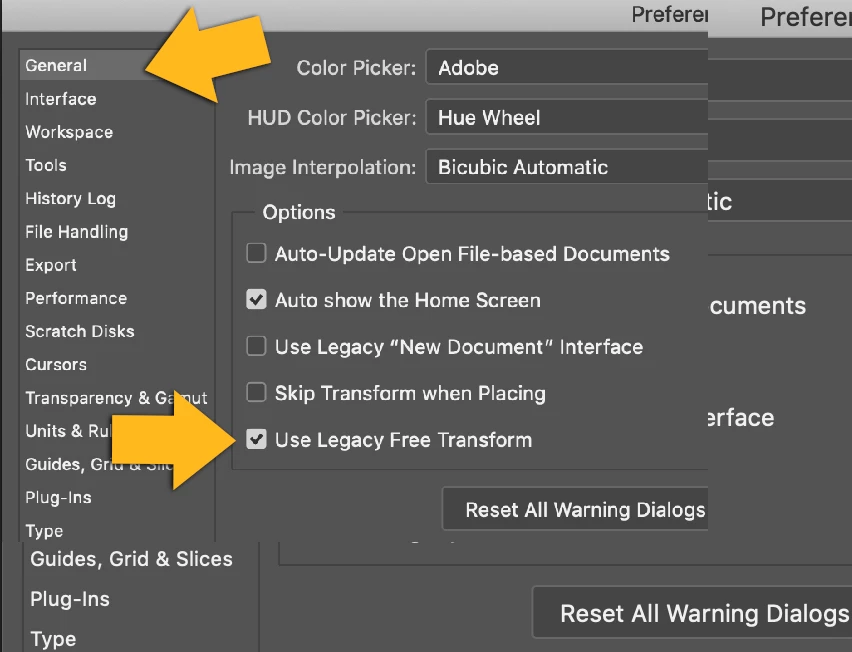
You can restore the old behavior if you mark the option "Use legacy transform" in the preferences. If you want to transform proportionally, hold down the shift key. Or you can leave the setting as is and hold the shift key to not transform proportionally.


2 replies

Bojan Živković11378569
Community Expert
Community Expert
January 4, 2020

Free transform have canged in meantime, by default it is transforming proportionally, here are details https://helpx.adobe.com/photoshop/using/free-transformations-images-shapes-paths.html

As already mentioned you can change this default behavior.

Participant
January 11, 2020

Thanks alot, did help me alot, to be honest i figured it out myself earlier but I'm knew to this community therefore i didn't knew how to reply answer to my own question.

Thank you 

Marianne-Deiters
Marianne-DeitersCorrect answer
Participating Frequently
January 4, 2020
You can restore the old behavior if you mark the option "Use legacy transform" in the preferences. If you want to transform proportionally, hold down the shift key. Or you can leave the setting as is and hold the shift key to not transform proportionally.