
Participant
July 19, 2018
Answered

Unable to Use The Color Blend Mode

  • July 19, 2018
  • 3 replies
  • 1056 views

I am trying to colorize a photo but when I went to set the blend mode of another layer to color mode, the option was greyed out. Furthermore I am also unable to change Vibrance, Hue/Saturation, etc or add any color at all. Here is a screenshot of what I am talking about.
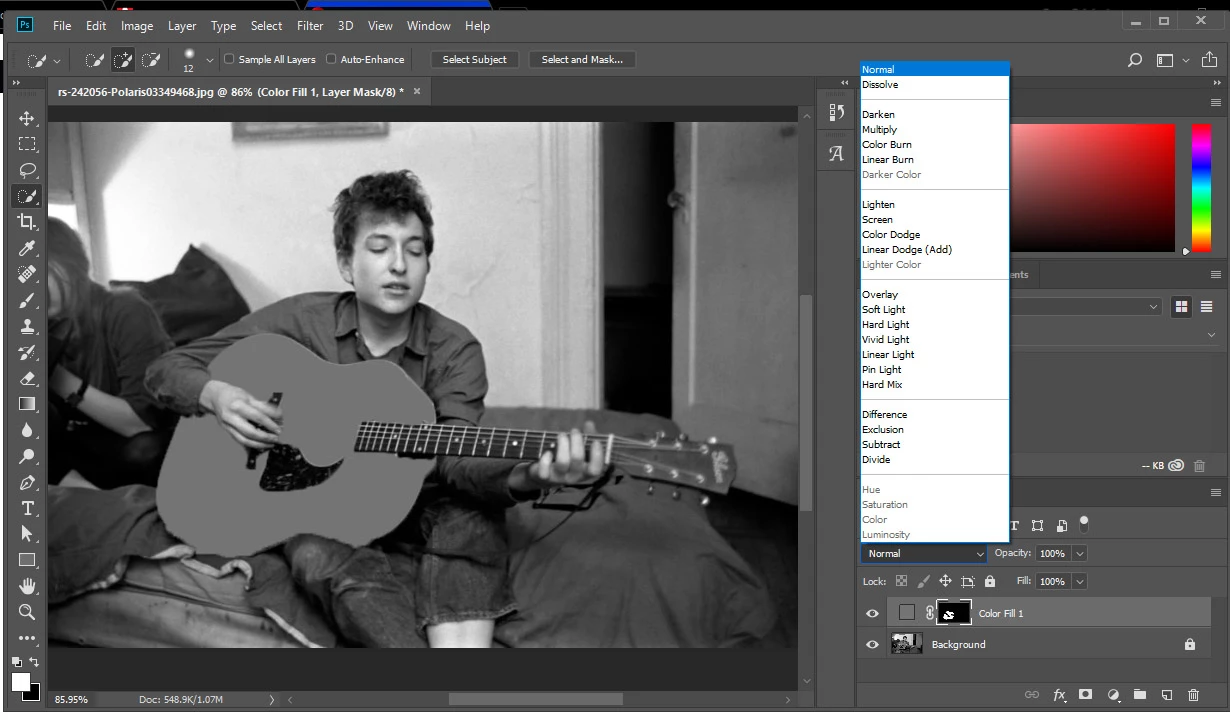
    This topic has been closed for replies.
    Correct answer Jeff Arola

    If in photoshop you go to Image>Mode what is checked?

    You want to be in RGB Color.

    3 replies

    Participant
    June 6, 2020

    thankyouu i was soo pissd off before

    Known Participant
    November 9, 2018

    I have another issue with the Color Blend Mode ever since I downloaded the latest CC version of Photoshop.

    Before, when I used a color and I set it to Blend Mode 'Color' it would recolor the layer below in a shade of that color.
    Now, when I do that, I get all sorts of color... sometimes I get green (even with a golden or cream color on top), or even purple (with a red layer!). Is this a glitch? For your information, my files are in RGB.

    November 9, 2018

    Hi

    In preferences > performance enable this option and restart Photoshop

    Known Participant
    November 10, 2018

    Hi Ged, thank you so much, problem solved!!

    Jeff Arola
    Community Expert
    Jeff ArolaCommunity ExpertCorrect answer
    Community Expert
    July 19, 2018

    If in photoshop you go to Image>Mode what is checked?

    You want to be in RGB Color.

    Participant
    July 19, 2018

    Huh, such a simple fix. Thank you!