
Participant
March 31, 2025
Question

Updated 26.6 & Not Opening

  • March 31, 2025
  • 1 reply
  • 118 views

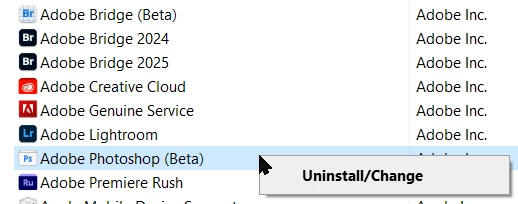
I have just updated Photoshop Beta version to 26.6.03011 in Windows 10 PC.  Now the programme won't open.  I then tried uninstalling it to reinstall but when I do click Uninstall/Change, it sends me to the Creative Cloud app!  What to do?  Any help gratefully received.


PS: I am not all that computer savvy, just the basics.


1 reply

mglush
Community Expert
Community Expert
March 31, 2025

Hi!

Sorry to hear you are having this issue! In the Creative Cloud app, try this:

  • Open the Creative Cloud desktop app: Launch the Creative Cloud application on your computer. 
     
  • Navigate to "Apps > All Apps": In the Creative Cloud app, go to the "Apps" section and then select "All Apps". 
     
  • Select the app to uninstall: Find the specific app you want to uninstall and click on the "More actions icon" (usually three dots). 
     
  • Choose "Uninstall": From the context menu that appears, select "Uninstall". 
     
  • Follow the prompts: The Creative Cloud app will guide you through the uninstallation process. 

 Let us know if you are able to successfully uninstall the app and reinstall it again.

Michelle