




Pete.Green
Community Manager
Community Manager
November 10, 2023
Question

Updates to issues encountered while generating images (User Guidelines Violations)

  • November 10, 2023
  • 41 replies
  • 21367 views

Hello Photoshop community!


If you've used Generative Fill and Generative Expand, it's possible you've seen this dialog:
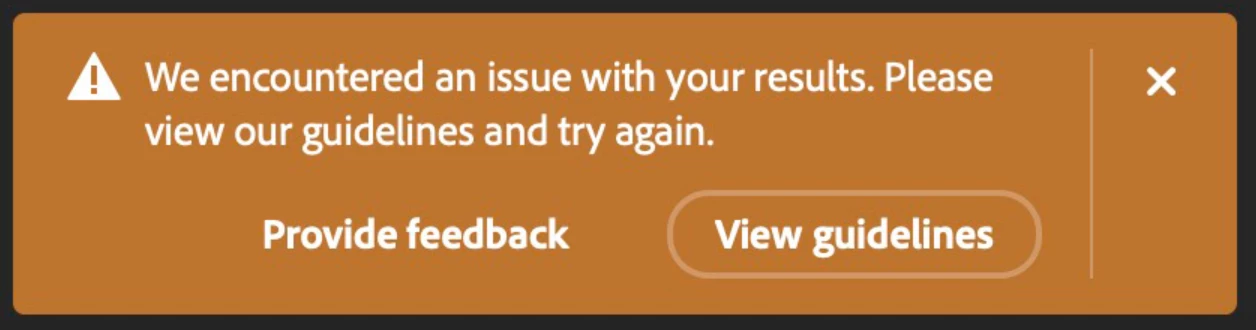


On November 7th 2023, the filters were adjusted to be less overly-sensitive, and we're still working to find the right balance here. If you continue to encounter issues after 11/7, please let us know in this thread!


Also, within this notice dialog, there is an opportunity to provide feedback to the team and request a review of the content. Please continue to use the feedback option to help us make improvements to this experience.


Thank you!

41 replies

CSI Productions
Inspiring
January 6, 2025

Test this on a dupe of your original:

I've been having some success by duplicating the image, cover the "offending" part of the image (just paint over it so it's hidden). Use this image to GenFill/Expand etc. Then copy/paste this on a layer "under" the original image (be sure you enlarge the original if you used Gen-Expand so the two dimensions match), display the original at 50% opacity so you can see the area to paint out and using your eraser tool (soft brish), erase the original to reveal the revised areas. Display the upper layer at 100% then flatten the image. Won't help with the model in a swimsuit directly but can be used to add remove or gen-expand stuff around the model.

R.CatesCSI ProductionsIf you want peace, be peaceful.
Participating Frequently
January 31, 2025

Yeah. That works with the area around for expansion as you said, but if you need to correct anything inside the area it is useless. With as much as we pay for service, we should not be having to do a workaround to get the product to work. It was created to help speed up workflow and us having to do all this to get it to work slows down workflow

Participating Frequently
January 6, 2025

It is still overly sensitive. Anything close to skin or "too much skin" is blocked. Bathing suits are constantly an issue if anywhere in the photo. Any photographers or photo editing professionals who work with professional models can't use this feature. As you can see, family vacation photos of clients who want things edited or even people removed constantly get blocked. Adobe is highly advanced and I am positive it can train it's AI to be better than this.

Participant
January 13, 2025

I absolutely continue to get this error, and am surprised to see I am not the only one.   A fashion shoot or style shoot that meets all guidelines for posting on social media are still generating these errors.


I would absolutely understand the desire to provide guidelines on prompt generation, but if I am simply filling in the corners of an image, this screening is rather concerning.  I am paying for a product from a company that declared at Adobe Max that this is the age of controls - so not having these controls is concerning.


At the minimum - some kind of feedback from the product as to WHY it triggered a warning would be helpful.

Lineefilms
Participating Frequently
January 3, 2025

It is not allowed to draw "knives" or "swords," making it impossible to design a coat of arms if the standard heraldic eagle is included.

Additionally, it is prohibited to depict any body part of ancient Roman sculptures because it is flagged as nudity. This is absurd, considering that I live and work in Rome in the architectural and archaeological field!

Please REMOVE THESE LIMITATIONS! We are not children. It is unacceptable to compensate for individual responsibility by imposing such ridiculously stringent restrictions.

ephotographic group
Participant
December 12, 2024

As a Florida based photographer that shoots commercial swimwear, fitness clothing and even lingerie, Photoshop is overcensoring everything I do. As a Photosop user for over two decades, I am just about at my breaking point, and in search of other alternatives. I pay for the software use, not your censorship of MY work.Please do away with this BS.  

Participating Frequently
November 2, 2024

I is absolutely infuriatinjg and insulting to not have any replies from Adobe to resolve falsly flagged "community guideline violations". This is damagin to my business and to my work as a reputable creative director. Ways to resolve such falsely flagged things should be mandatory by law.

Participating Frequently
November 3, 2024
At this point. I'm going to start investigating other company's Ai
programs.
For some time. I had been adding a layer above my subject. So I could cover
any excessive skin to get by adobe's excessive community standards
censoring.
As of the last update. Ai Generative fill has become completely useless for
any of my work.
Any skin whatsoever is now cause to activate the filter.
I can paint over almost the entire model. Male or female. And it still
activates.
At one point. I was adding a bikini top and it activated. Even though I had
the 'naughty bits' covered.
A male model in swim shorts. As in basketball length shorts wouldn't render
slack because of violating standards.
A few minutes ago. I tried once again. With a top layer blocking most of
her body. And again. It won't work.
Does anyone have an Ai generator that doesn't do this? I'm open to
suggestions.
attached is the image that would have worked before the last update. But
won't work now.
Participant
November 19, 2024

The Ai is checking all layers beneeth. You would have to make a mask, paint the area, compres the layers, copy and paste it in new document. After the adjustment with Ai copy and paste the newly created layer to the original document and unmask/delete the masked area. This is how I does it... untill Adobe starts checking all open documents at once. It is prety frustrating 🤬🤬🤬

Participant
October 28, 2024

This is really annoying! One - Adobe shouldn't be monitoring what images I'm retouching. I've payed for the software. Two, it triggers the warning for most images that include closeups on a model. No matter if they are wearing clothes or not. I've left many times my email in the feedbacks so someone could explain why the resuts are blocked. So far no one bothered

Participant
October 28, 2024

I suspect it's down to the AI training data or algorithm. It's frustrating. 

Participant
October 21, 2024

Every since upgrading to Photoshop 2025, my generative fill keeps saying "we've encountered a problem." and it's a simple tattoo removal!  SO FRUSTRATING.  Is there any resolve??

Participant
September 19, 2024

I was editing an image using the generative fill in Photoshop 25.12.0 and out of nowhere I got this alert: "We have restricted your access to Firefly due to a violation of our terms of use..." and the truth is that I didn't violate anything, I pay the basic version of Photoshop with Lightroom and I wasn't trying to generate pornography or similar things with the tool.

Participant
September 19, 2024

This happened and now it says firefly has restricted access. I can't use it at all.

Participant
August 20, 2024

Im having issues expanding any photos with shirtless men

Participating Frequently
September 19, 2024

I started adding a blank layer above it. and using a brush to block out the torso. It lets the ai believe they're wearing a cover garment.  Just remove the layer once you've got your expansion. 

CSI Productions
Inspiring
September 19, 2024

That's an excellent tip for those needing to expand backgrounds from swimsuit models, fashion, marketing for suntan lotion etc. Tons of situations where this could be all that's needed. THANKS Tonya!

R.CatesCSI ProductionsIf you want peace, be peaceful.