Participant
Nov 18, 2026 9:41 PM UTC
Answered

Vertical Text Tool Putting Some Characters Side by Side

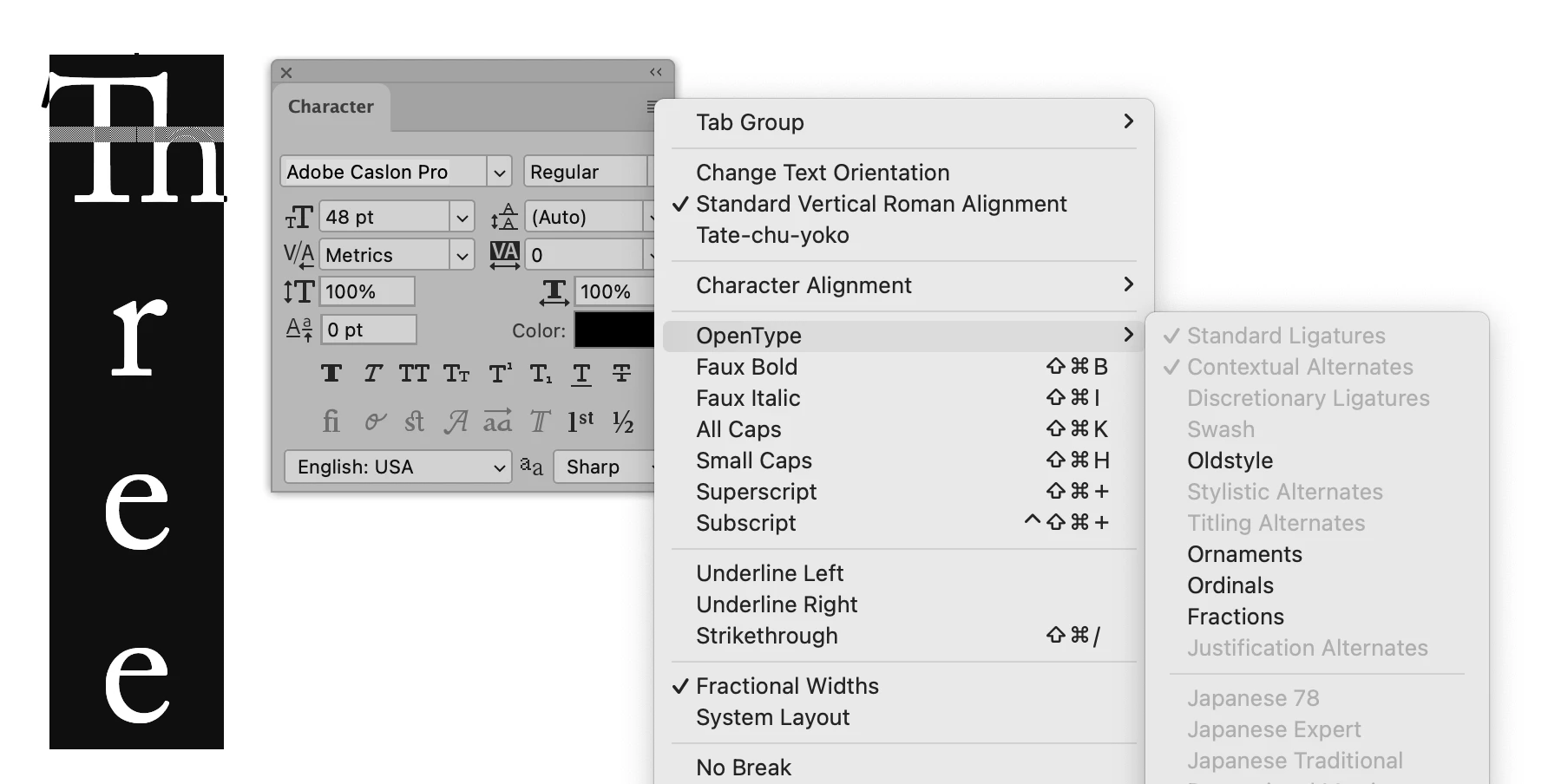
I’m using the vertical text tool in “point type” (not text box) mode. When I’m typing, it puts some characters side by side instead of vertically. For instance, if I’m typing “Three” it puts Th on one line, then r on a new line beneath that and e on a new line and the final e on another new line below that.

Th

r

e

e

It just started doing this today. (11/18/2026). Before, this tool has always worked perfectly. I have done a “Reset Preferences on Quit,” but that didn’t help.

Any suggestions would be appreciated!

    jane-e
    jane-eCorrect answer
    Community Expert
    Nov 19, 2026 12:31 AM UTC

    ​@Green Eric 

    I think the Th are being seen as a ligature. Open the Character panel (Window menu) >  and use the panel menu to turn off ligatures from the OpenType flyout.

    What typeface are you using?


    Alternatively, use a different typeface that does not have ligatures.


    Jane

    6 replies

    jane-e
    Community Expert
    jane-eCommunity ExpertCorrect answer
    Community Expert
    Nov 19, 2026 12:31 AM UTC

    ​@Green Eric 

    I think the Th are being seen as a ligature. Open the Character panel (Window menu) >  and use the panel menu to turn off ligatures from the OpenType flyout.

    What typeface are you using?


    Alternatively, use a different typeface that does not have ligatures.


    Jane

    Translate
    jane-e
    Community Expert
    Community Expert
    Nov 19, 2026 1:49 AM UTC

    ​@Green Eric 

    If you are unfamiliar with ligatures, watch this short video from Nigel French, typography expert:


    Jane


    Translate
    Participant
    Nov 19, 2026 4:32 AM UTC

    Thank you, Jane. I tried checking and unchecking Standard Ligatures, and it didn’t make any difference. Then I changed my font from Adobe Casion Pro to Times New Roman and the problem went away. I appreciate your help!

    Translate
    Jeff Arola
    Community Expert
    Community Expert
    Nov 18, 2026 11:54 PM UTC

    What version of Photoshop and operating system are you using?


    Have you tried different fonts to see if that makes any difference?

    Translate
    Participant
    Nov 19, 2026 4:14 AM UTC

    I’m on Windows 11, latest update. I’m using Photoshop 2027, updated yesterday. I changed from Adobe Casion Pro to Times New Roman and the problem went away.

    Translate