
Participant
June 29, 2026
Question

Very bad banding since the latest update

  • June 29, 2026
  • 3 replies
  • 0 views

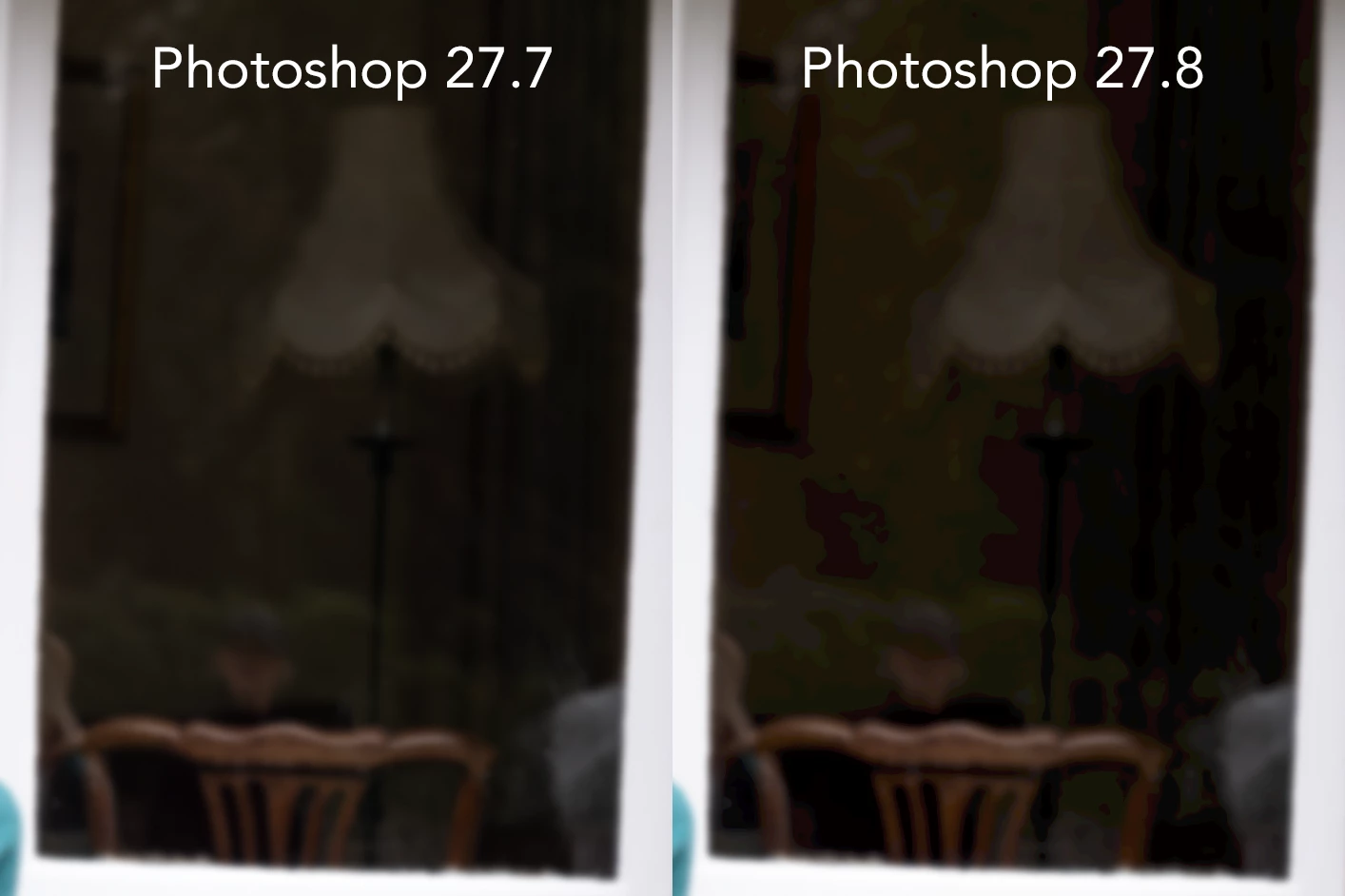
Updated photoshop to 27.8 and the banding on gradients is really bad, PS27.7 was absolutely fine.

Attached is a screenshot of PS27.7 alongside PS27.8.

You can see clearly the banding, this has only happened because of the update, not anything that I have done.

Anyone else had this issue? As I can't seem to find a solution online.
 

    3 replies

    Participating Frequently
    June 29, 2026

    Was having the same issue with very bad gradient banding in 27.8 (and 27.9 beta).  Initially had to downgrade back to 27.7 to fix the issue.  After reading some suggestions online,  I was able to turn off ‘Precise Color Management for HDR display’ (must quit and relaunch after) under the ‘Technology Previews’ setting, and it seemed to resolve the issue in 27.8 so far.

    [Mac Studio M1 Max, OS Tahoe 26.5.1, Apple Studio Display with default Apple Display Profile]

    DanPowerAuthor
    Participant
    June 29, 2026

    Hey there,

    Thanks for replying.

    I’m using a Mac, Apple M2 Max 2023, OS Tahoe 26.5.1, Eizo CG247 monitor.

    I updated Photoshop to 27.8, saw this issue, then re-installed 27.7 and the issue went away.

    I haven't reset the preferences yet and it is happening on all images and layer masks.

    I opened an image in PS27.8, saved out a JPG, which looked bad, then opened that JPG in PS27.7 and it looked OK.

    The fact that it went back to normal after I re-installed version 27.7 tells me that the issue is with the update.

    It’s also happening with Photoshop Beta 27.9.

    Hope this info helps you.

    Spas K.
    Community Expert
    Community Expert
    June 29, 2026

    I see, can you check out this thread and the reply by ​@D Fosse and see if it helps? Seems others with a similar configuration have reported issues with banding and colors overall.

    Does it happen in both CMYK and RGB modes? Does disabling "Use graphics processor” in Performance preferences change anything? 

    Spas K.
    Community Expert
    Community Expert
    June 29, 2026

    Don't have this issue personally. Are you on Windows or Mac? Have you tried resetting preferences? Are the images identical after export / outside of PS? Is it happening on all files / images?