
Inspiring
June 26, 2023
Answered

Video GPU Incompatibility Questions

  • June 26, 2023
  • 1 reply
  • 759 views

I am a LrC user who occassionally jumps into PS work work I can't do there. Today, after the latest update, I was presented with the following screen.
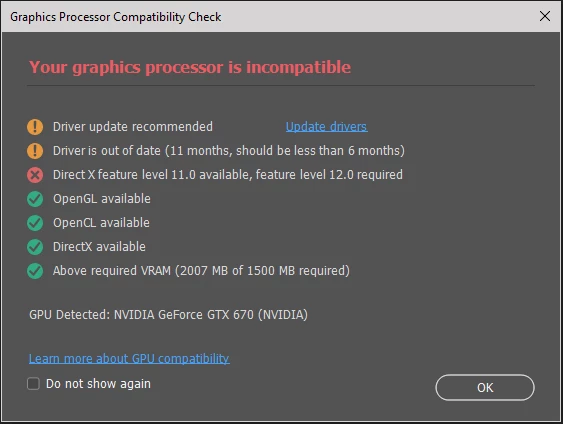
Searching NVidia's site, I could only find a driver update from 2021-09-20 even though my system info (see attached) shows the current version is from 2022-07-11.

I've followed the guidance from Troubleshoot Photoshop graphics processor (GPU) and graphics driver issues but can't satisfy the need for a driver within the last 6 months as well as the need for DirectX 12.

Yes, the system I am running on is old so I would likely upgrade my system rather than purchase a new Video card. However, my concern is around the need for picking a vendor that will update the drivers in the 6 month time window Adobe wants. Is this realistic? 

Looking for more insights into what these errors could mean without having to create errors/crashes myself.

Thanks

This topic has been closed for replies.
Correct answer Kevin Stohlmeyer

Hi @DS256 First there are most likely no more upgrades available for this driver given the age of the GTX670.

Your card is too old and does not support DirectX12 (only 11.2) so you wont find an update to satisfy that either.

The issue is not a "6 month time window". Photoshop will always alert you to outdated drivers.

The issue preventing you from working properly is running a card not DirectX 12.2 compatible.

For now you could go to Photoshop Preferences/Technology Preview and check “Disable Native Canvas”. Then check “Use Older GPU Mode (2016)”. Quit and relaunch PS.

1 reply

Kevin Stohlmeyer
Community Expert
Kevin StohlmeyerCommunity ExpertCorrect answer
Community Expert
June 26, 2023

Hi @DS256 First there are most likely no more upgrades available for this driver given the age of the GTX670.

Your card is too old and does not support DirectX12 (only 11.2) so you wont find an update to satisfy that either.

The issue is not a "6 month time window". Photoshop will always alert you to outdated drivers.

The issue preventing you from working properly is running a card not DirectX 12.2 compatible.

For now you could go to Photoshop Preferences/Technology Preview and check “Disable Native Canvas”. Then check “Use Older GPU Mode (2016)”. Quit and relaunch PS.

DS256Author
Inspiring
June 27, 2023

Thanks for the clarification on the pop-up messages @Kevin Stohlmeyer . I also implimented your suggested changes in preferences. Everything seems to be working just not that fast.

NB, colourmanagement
Community Expert
Community Expert
June 27, 2023

@DS256 in case it helps your future decisions - here's some further clarification from Adobe:

First check the system requirements: https://helpx.adobe.com/photoshop/system-requirements.html

next:

https://helpx.adobe.com/photoshop/kb/troubleshoot-gpu-graphics-card.html

https://helpx.adobe.com/photoshop/kb/photoshop-cc-gpu-card-faq.html


I hope this helps
neil barstow, colourmanagement net - adobe forum volunteer - co-author: 'getting colour right'
google me "neil barstow colourmanagement" for lots of free articles on colour management