Volity
Participant
January 7, 2020
Answered

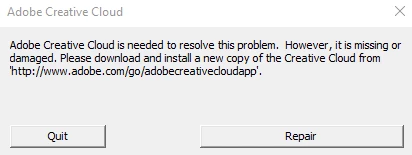
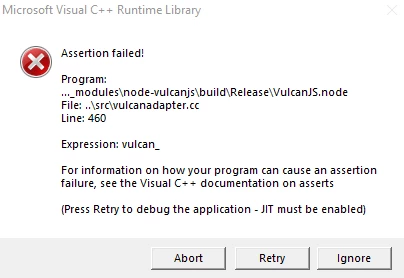
Visual C++ Runtime Library Assertion Failed Line 460 vulcanadapter.cc

  • January 7, 2020
  • 5 replies
  • 79232 views

I've been using photoshop for a good while now, and for some reason I went on my pc to see that creative cloud no longer functions and I had an error that pops up every time I launch creative cloud or photoshop. I tried fixing this through multiple methods;

1. reinstalling the visual c++ redistributals

2. reinstalling creative cloud and photoshop

3. windows update


nothing seems to work anymore, photoshop doesn't even let me make a new document and I can't save my progress. Photoshop is really important to me as I need it for University work. If anyone knows how I can fix this, it would be very much appreciated


Thank you
 

This topic has been closed for replies.
Correct answer War Unicorn

Sounds like something went kablooey with the Visual C++ libraries.


Other things to try:


Creative Cloud Cleaner Tool

https://helpx.adobe.com/creative-cloud/kb/cc-cleaner-tool-installation-problems.html

(Be sure to follow everything to the letter as it involves some time and effort.)


If that still doesn't solve the issue, it may be time to go brute force and do a format of the system, especially if it hasn't been done in awhile.

5 replies

Adobe Employee
December 18, 2024

Hello,

I encoutered the same issue on my laptop (Windows 11) after using Creative Cloud Cleaner Tool. So basically I had this popup periodically even if all adobe apps were uninstalled. Seems like the issue was related to the leftovers folders from Adobe apps, especially the ones in C://Program Files/Adobe. Because for me the error message included CCX process which was in this specific folder. 

In any case to get rid of this error message WITHOUT reinstalling Windows you should uninstall all Adobe apps using CC cleaner : 
https://swupmf.adobe.com/webfeed/CleanerTool/win/AdobeCreativeCloudCleanerTool.exe

Then you can delete all Adobe folders in the following folders ;

C://Program Files/Adobe
C://Program x86/Adobe
C://Program x86/Common Files/Adobe

Known Participant
May 11, 2020

This has to do with the C++ 2013 Version 
And you should install the 32bit version even if you have Windows 64bit version.
You can install both versions (32bit and 64bit)  just in case. But the C++ 2013 32bit version (vcredist_x86.exe) was the one that solved the issue.
Hope this helps.
https://www.microsoft.com/en-us/download/details.aspx?id=40784

Participating Frequently
May 20, 2020

I got this in Premiere, Windows 7. Earlier in the day there was a power outage, and when I rebooted I got a creative cloud error.


Not sure it's related to visual C++  because I hadn't updated that in a while, or installed anything related to it.

For me, the fix that worked was this: I disabled the CC-related services (not just stopping the process but ending the services) and ended their processes. After OKing the error, I saved my project, closed and restarted Premiere. So far it seems to work fine. Hopefully helps, shouldn't have to reformat the whole PC for something like this.

Participant
May 4, 2020

Hi there,
Not sure if this is useful but I was installing creative cloud on a fresh install of windows when I ran into this problem. I used the cleaning tool and it didn't work. However, the one change I had made to the OS was using the registery editor to change the default save path of new programs. Once a restored these registers to their original values, the creative cloud app installled just fine.

Participant
September 4, 2020

Thank you so much! Your answer saved me from having to completely reinstall Windows and format the hard drive!

Participant
April 5, 2020

Hi guys,

are you shore there is no other option at all than reinstalling windows?

I tried the cc-cleaner-tool exactly as described and it unluckily also didn' t help at all...

I just installed all the programs I need and all the games I need and I really don' t want to start over again... (especially because I didn' t have any USB-Booting-USB and my notebook and as well my desktop where completely unusable the last 2 days and I even had to use my wives macbook to burn a windows 10-Image so that I could install it by DVD on the old school way and troubles don' t seem to stop here...)

War Unicorn
Community Expert
Community Expert
April 6, 2020

If you're having the same issues as Volity did, then maybe. It's a last-ditch effort if nothing else works as it's involved, as I mentioned before.


I remember the days where I actually had to backup my email, browser bookmarks, critical documents, etc. before formatting. Luckily, that's almost a thing of the past and the only thing that's usually time-consuming is reinstalling the OS and programs.

Participant
April 6, 2020
Yes... I had the exact same issue...
 
It' s a pity that you didn' t have any other proposals...
 
I' ll go for the Reinstallation of Windows than - which I was already preparing... 😞
 
Now I' m buying EaseUS Todo PCTrans 11 Professional to be able to restore all of the programs I installed and need...
This is always the most annoying and time consuming part about the reinstallation of Windows to reinstall all the Programs and Games I need...
 
Thank you for your Answer anyway.
War Unicorn
Community Expert
War UnicornCommunity ExpertCorrect answer
Community Expert
January 7, 2020

Sounds like something went kablooey with the Visual C++ libraries.


Other things to try:


Creative Cloud Cleaner Tool

https://helpx.adobe.com/creative-cloud/kb/cc-cleaner-tool-installation-problems.html

(Be sure to follow everything to the letter as it involves some time and effort.)


If that still doesn't solve the issue, it may be time to go brute force and do a format of the system, especially if it hasn't been done in awhile.

Volity
VolityAuthor
Participant
January 9, 2020

I basically reinstalled Windows and formatted my D drive. After reinstalling everything, it's all back to normal. Issue resolved!

War Unicorn
Community Expert
Community Expert
January 9, 2020

Yay! 😄  Glad to hear that, Volity!