
VSCode Extendscript Debugger won’t initiate Photoshop debugging session, just hangs
I’m fairly (though not 100%) sure I’ve used the VSCode debugging extension for Photoshop before, but I can’t get it to work currently.
If I try to initiate a debug session, the debugging icon in the vertical menu on the left gets its ‘running’ badge, and a little blue line appears just under the “Run and Debug” section top left, running from left to right to indicate that something is being worked on, like so (the blue line under the g in ‘Debug’ here):
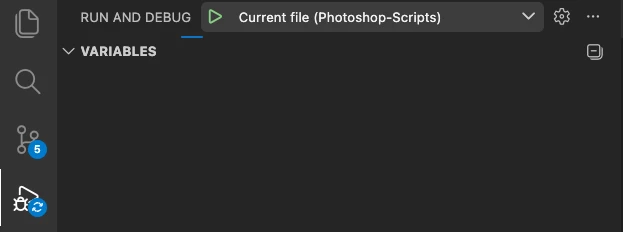
And that’s how it stays – nothing more happens. No error message, no timeout, no debug session – nada.
Initiating a debug session with InDesign using a configuration that is completely identical (except for the host app specifier, of course) works fine – it’s just Photoshop where it doesn’t work.
This is the configuration I’m using:
{
  "version": "0.2.0",
  "configurations": [
    {
      "type": "extendscript-debug",
      "request": "launch",
      "name": "Current file",
      "script": "${file}",
      "hostAppSpecifier": "photoshop-200.064",
      "engineName": "main"
    }
  ]
}
I’ve tried leaving out the host app specifier so I have to choose it from a drop-down list – that made no difference. I’ve closed and restarted both VSCode and Photoshop – also no difference. This happens with all scripts (including some with `#target photoshop` at the top and some without).
What can be causing this behaviour?
[M2 Mac Studio, macOS Sequoia 15.8, Photoshop 2026 (27.11.0), VSCode 1.117.0, Extendscript Debugger 2.1.0]


 AdChoices