
Inspiring
March 18, 2020
Beantwortet

Wacom Express Keys yet again not working for Photoshop

  • March 18, 2020
  • 2 Antworten
  • 7654 Ansichten

Model: Cintiq 27QHD

Wacom Driver: 6.3.38-2 (Latest)

Photoshop:21.1.1 (Latest)


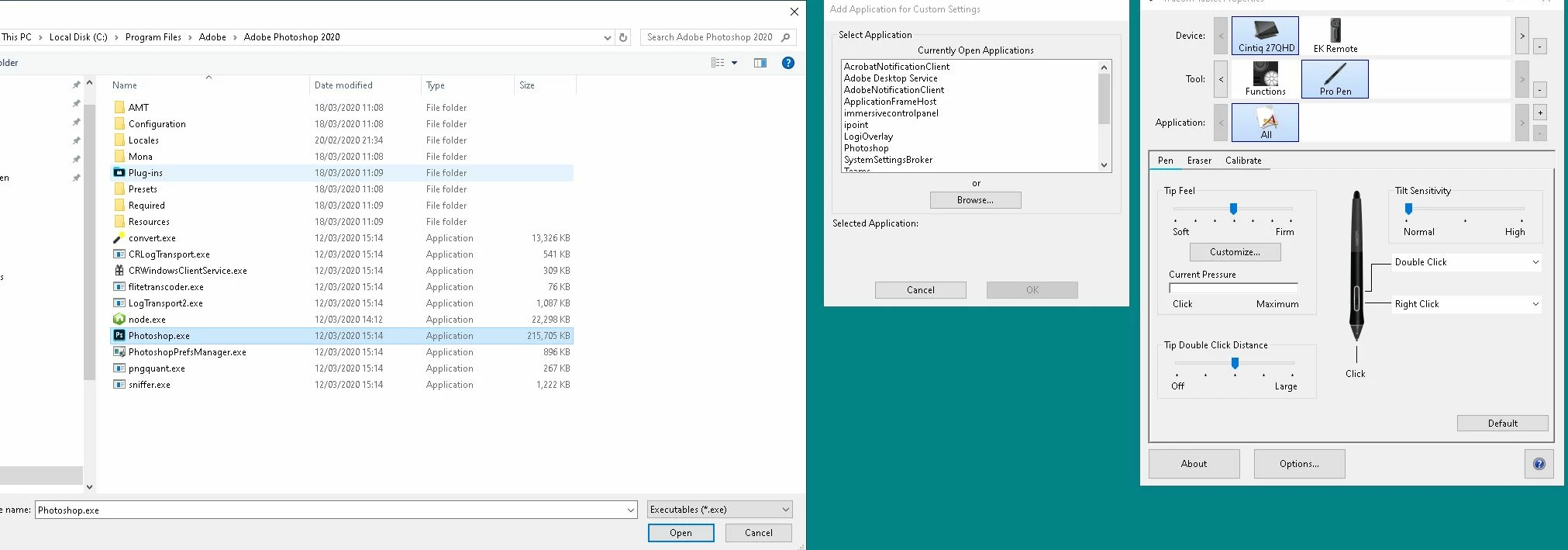
So my express keys on my remote are not working correctly for Photoshop. When I add the Photoshop.exe and change the buttons nothing happens. It doesn't recongise the changes and keeps the "All Other" key bindings.


This is such a re-occuring problem I've had with Wacom and Photoshop and over the past year or two and I've never been able to fix it.


Any help on this would be greatly appreciated.


Thanks,

Keith
Dieses Thema wurde für Antworten geschlossen.
Beste Antwort von keithm12552301

So I was able to fix it by uninstalling everything wacom related.

I used a software called Everything to find anything related to wacom and removed it from my PC. Restarted, re-downloaded and then re-installed the drivers.

Seems to be working now but lets see for how long.

2 Antworten

Participant
August 31, 2021

Just had this problem where I had Adobe Illustrator 2020 as one of the Applications for EK Remote but because Adobe Illustrator updated to 2021 version my inclanations were to add another Application for Adobe Illustrator 2021. EK Remote setting for Illustrator 2021 didn't work but the 2020 version still work. After 4 hours of troubleshooting, I finally talked to Wacom for support and walked through with me using this complete uninstalling and reinstalling for the Wacom driver.


https://support.wacom.com/hc/en-us/articles/1500006264541-How-do-I-uninstall-manually-and-re-install-the-Wacom-driver-on-Mac-OS-for-a-Pen-Tablet-Pen-Display-or-Pen-Computer-?epik=dj0yJnU9dk9fVXNGZDJFQ2FaVU1PbHZCU0sxMjllY0x3aHEyN28mcD0wJm49Qk9BajR6U2VuQmliOHdKNjRSOHhNZyZ0PUFBQUFBR0V1VGpj


To sum things up, when you unintall the Wacom driver (for whatever reason it may be), make sure you delete every file that is related to it so that you have a successfull and clean install. On that page^^ has the files you have to delete. Good luck guys!

LinSims
Community Expert
Community Expert
March 18, 2020

Let me move this to the Photoshop forum for you, where you are more likely to receive an answer to your question.

The Community Help forum is for help in using the Adobe Support Community forums, not for help with specific programs. Product questions should be posted in the associated product community.

keithm12552301AutorAntwort
Inspiring
March 23, 2020

So I was able to fix it by uninstalling everything wacom related.

I used a software called Everything to find anything related to wacom and removed it from my PC. Restarted, re-downloaded and then re-installed the drivers.

Seems to be working now but lets see for how long.