Participant
December 30, 2016
Answered

Wacom Intuos5 express keys not working

  • December 30, 2016
  • 2 replies
  • 17097 views

Greetings,

I am hoping the Adobe community can help me with this issue.  Wacom support is very poor and has only provided the answer that my problem is an Adobe issue.  Here is the background on my problem.  I am running current version of 2017.0.1 for PS. I have Windows 7 Ultimate as my OS.  On 12.16.16, Adobe pushed out a CC update to Photoshop. Since then, the express keys and radial dial on my Wacom Intuos5 tablet have not worked in PS even though under the tablet properties it shows configured correctly with the express key shortcuts I want.  I currently have the driver 6.3.15-3 installed for the tablet.  I have not upgraded to the latest driver of 6.3.19-3 simply because when I attempted this, the tablet did not work at all in any Adobe program.  I then rolled back to the previous driver of 6.15.3-3 on the tablet.  The plot thickens!  The tablet works flawlessly with Adobe Lightroom. Illustrator and Premiere Pro.  All the programmed express keys do what they are supposed to do. Photoshop is the only program it does not work in.  I am inclined to believe that this is and Adobe issue with the latest CC update or PS simply because PS seems to be the only program affected from Adobe.   I have read countless threads here on previous versions of PS CC and Wacom tablet compatibility, but nothing specific for 2017 CC.  Some threads were informative and others remain unanswered.  I am hoping that Adobe can provide some answers and assistance. Is there any update coming to fix this?  Any suggestions on how to resolve the express key dilemma currently?
This topic has been closed for replies.
Correct answer JJMack

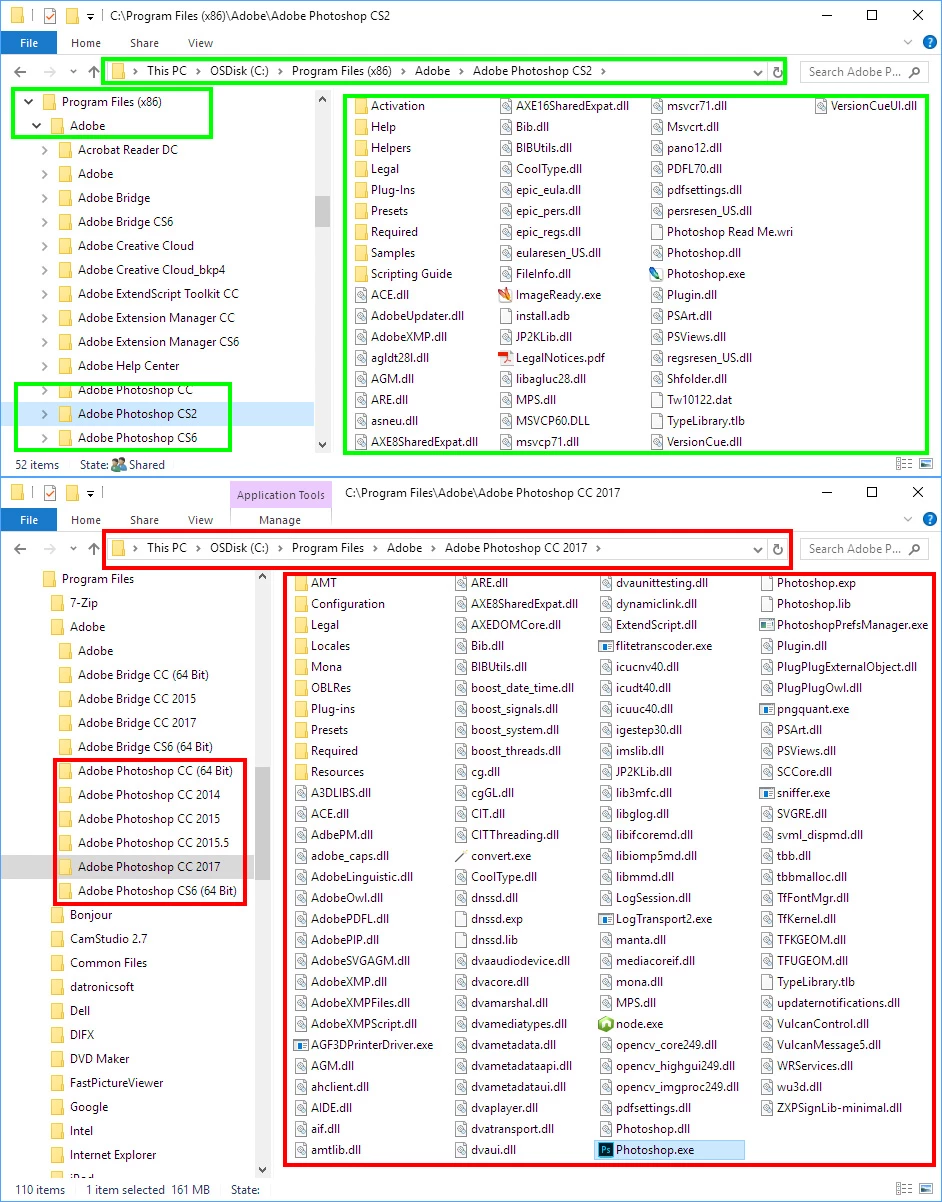
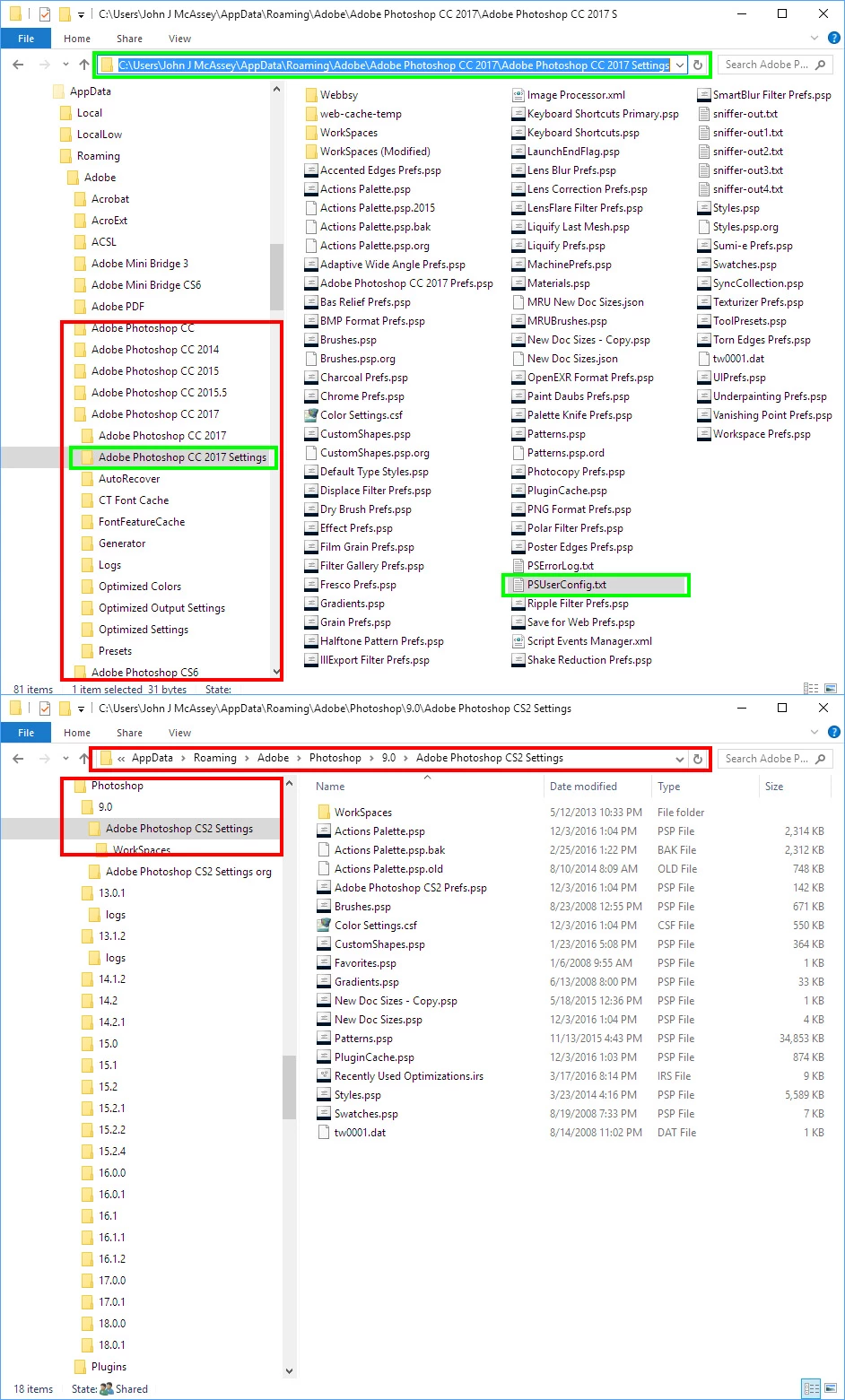
That file "PSUserConfig.txt" is copied into your User ID Photoshop Preferences for each creative Cloud version version of Photoshop that can use Microsoft INK Interface for Pen support to use WinTab API instead.  It does not need to be in older version of Photoshop older versions like CS2 only support Wintab API.  I do not use that file on my  Microsoft Surface Pro 3 where I may use my Wacom Intuos Pro or Surface Pro 3 Pen.  Windows 10 has some Pen and Touch support the I do not remember Windows 7 having.  Top Window File Explorer capture shows where the Creative cloud versions of Photoshop stores User Preferences.  The Bottom File Explorer show where Older versions of Photoshop Stores User Preferences you can see my CS2 setting there.  CC 2017 outlined in Green.  All Photoshop versions in Red. I never installed CS3 version 10, CS4 version 11 or CS5 version 12 on this machine.

Installed versions of Photoshop 32Bit versions in Green 64Bit Versions in Red

2 replies

JJMack
Community Expert
JJMackCommunity ExpertCorrect answer
Community Expert
December 31, 2016

That file "PSUserConfig.txt" is copied into your User ID Photoshop Preferences for each creative Cloud version version of Photoshop that can use Microsoft INK Interface for Pen support to use WinTab API instead.  It does not need to be in older version of Photoshop older versions like CS2 only support Wintab API.  I do not use that file on my  Microsoft Surface Pro 3 where I may use my Wacom Intuos Pro or Surface Pro 3 Pen.  Windows 10 has some Pen and Touch support the I do not remember Windows 7 having.  Top Window File Explorer capture shows where the Creative cloud versions of Photoshop stores User Preferences.  The Bottom File Explorer show where Older versions of Photoshop Stores User Preferences you can see my CS2 setting there.  CC 2017 outlined in Green.  All Photoshop versions in Red. I never installed CS3 version 10, CS4 version 11 or CS5 version 12 on this machine.

Installed versions of Photoshop 32Bit versions in Green 64Bit Versions in Red

JJMack
Karmalakas
Known Participant
April 1, 2017

Hi, I've been searching for a week now, but still no solution :/
I'm on Windows 10 x64 with latest Photoshop CC 2017 and Intuos Pro (driver 6.3.21-7; 03/29/2017). Pen pressure not working. Express keys not working (I believe Photoshop is not recognized as a running application - see image bellow)

There wasn't any PSUserConfig.txt, so I created one - still no luck.

Tried removing and adding back Ps to Wacom Tablet settings - didn't help either.

Can't even count how many times I've restarted my PC after changing every single configuration option.

Any idea how to make use of my tablet again?

f8c91d98c05e493bbf61451345e4f548.png

Update: managed to get pressure working by disabling Windows Ink use in Tablet properties.

JJMack
Community Expert
Community Expert
April 1, 2017

I have not installed the latest Wacom Driver yet.   If toy add the PSUserConfig.txt to your Photoshop Preferences. You must also uncheck Use Window in your Wacom Tablet Preferences for Photoshop  pen mapping so Wacom will use WinTab APIs with Photoshop. I will install the latest  drivers to see ir Pen pressures still works for me. I'll let you know. Check you configuration files. PS and Wacom.

Its also OkK also

JJMack
JJMack
Community Expert
Community Expert
December 31, 2016

There are many threads on Problem with Wacom Tablets.  There are many OS version, many Photoshop versions and many Wacom driver versions.  Depending on what software you have installed there are Operating System settings that need to be set,  Photoshop Settings the need to be set and Wacom setting that need be set so everything works together in a useable way.  Some things like double click distance may not seem important but with Photoshop Brushes and Wacom pen it is best to be set to off. I have many version of Photoshop installed including CS2.  Old versions of Photoshop only support the Wacom pen using Wintab API for communication.  So I configure Wacom drivers not to use Microsoft INK api for Photoshop and configure all versions to use Wintab APD when communicating the wacom pen.   I now use windows 10 and there are setting the control panel Pen and touch, and mouse  panels the need to be set from their default settings. I'm posting what seem to work for me.  I have Window 10 and Photoshop CS2, CS6, CC, CC 2014, CC 2015, CC 2015.5 and CC 2017 installed. All version of Photoshop have bugs.  Also if you set a large brush tip, Spacing 1% there will be brush lag.  Make it a wet mixer brush and you will thing Photoshop is using slow motion.

JJMack
PWC3966Author
Participant
December 31, 2016

Many thanks for the very detailed response JJMack.  It is good to know that there have been issues with all versions of PS with the Wacom tablet.  I appreciate you posting your settings and this gives me a baseline to start troubleshooting further.  If I may ask the question, I see you have written something in Notepad.  Did you alter any of the config settings by adding this to a file?  If so, where did put this over ride so to speak?

Patrick