Participant
August 7, 2018
Answered

Watermark with Script and/or Actions

  • August 7, 2018
  • 4 replies
  • 3340 views

Hi, i have found several guides on how to do it with normal images but i haven't found anything that will allow me to change canvas size and the image in it if its to big it should be downsized to fit within a frame in that canvas if its a tall image it should keep the constraints, what i have done with actions so far is: Open image > canvas size 585x585px > Image size Height 471px with constraints > Place watermark bottom right corner > save as > close, But if its a landscape image that will go out of bounds on the width, is there a way to get the image centered inside that 471x471px box i have in the canvas no matter the orientation, i don't know scripting and i just learned about Actions so I'm pretty beginner.

Thanks.

Its a pretty bad explanation so if you want further info i can get some screenshots

    This topic has been closed for replies.
    Correct answer JJMack

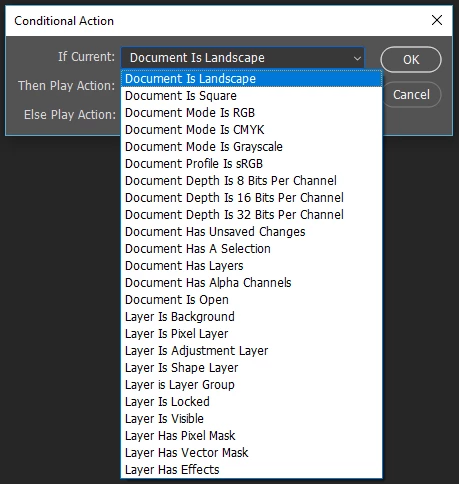
    Yes there are conditional action possible. You can test if the Document is a Landscape. You can also test for a few other things.

    Some things you can not test for. One is document size and resolution. You do not need to know if a document has a landscape orientation to align a watermark to the bottom right corner their action does that.   The problem is knowing what size watermark to use for different size document.  An Action could scale the document to a particular width or height using Image size with resample not check the size the watermark layers for than size document without a problem.  No Image Pixel will be Changed, deleted or added.  All that was changed is the document print size.  Which you can change before you print.  Action have many limitations there are very few conditions they can test for.  Conditional steps are the only logic action can use without using some scripting.

    Scripts have no problem dealing with document Sizes and layer sizes. A script is what should be used here.

    4 replies

    Participant
    August 8, 2018

    I think i have fixed it the way i want it to function, perhaps a better way exists but this works for now, its very slow but works.

    I had to open the watermark separately and copy it over, if i just Place(d) it on the image, sometimes it got really small and sometimes huge, i don't know if its possible to Fit Image for a specific layer so i just did this method, thanks for the help guys, trial and error works wonders sometimes

    JJMack
    Community Expert
    Community Expert
    August 8, 2018

    If you want to batch place your watermark on the bottom right of any size image its a very simple action if you use my Script in your action.  The action need one step.

    Action PlaceWatermark

    Step 1 with any document open record menu File>Scripts>PlaceWatermark

    Stop recording action is complete.

    To be able to record that step before you open Photoshop you need to copy the script I posted a link to into your Photoshop's Presets\Scripts\ folder and you need to edit the script with a text editor to customize it to place in your logo.  You customize the script by changing the four vars statement in the begging of the script.  In your case you may only need to change the first one to point to your Watermark file.   It should be a large image for the script will size it for your current image being edit.  The script will place in your Watermark onto your image then Change the Smart Object layer Transform to resize the watermark toe be some percentage of the images height.   That  one or the other vars I have it set to 10 the other two vars are for margin and alignment I have set 1% of height and bottom right.  I posted this link to the JSX file use it to download the script.

    http://www.mouseprints.net/old/dpr/PlaceWatermark.jsx 

    The script look like this I tried to make it easy to read what it does.

    JJMack
    Participant
    August 8, 2018

    Final image should look like this, this is the template i use to manually fix those that the batch-action doesn't work on, canvas is 585x585 and the image needs to be resized to within 471x471 no matter the image orientation, is it possible at all? Feels like i need an if/else-statement, if height>width then resize height to 471px, Else resize width to 471px, and since i can't script at all i can't make something on my own that will do this

    JJMack
    Community Expert
    Community Expert
    August 7, 2018

    Customize using first four var statements.

    http://www.mouseprints.net/old/dpr/PlaceWatermark.jsx

    JJMack
    Participant
    August 7, 2018

    This seems to have done the trick so far got like 3000 images to put a watermark on so i really want it to work, i aint gonna do it manually

    Legend
    August 7, 2018

    Do you have access to Lightroom?

    You can easily do this too however many images within Lightroom if so, simple import the 3,000 images Edit > Edit Watermark > insert Text/graphic > Set Details > Save preset and when you Export set the watermark created.

    Participant
    August 7, 2018

    That works in PS as well, but like that image you posted, i want that with white borders inside a canvas, the canvas is 585x585 pixels and the image itself should fit inside a square in the middle that are 471x471 pixels, I've tried a bunch with some images many of them works just fine with my watermark action but some the watermark becomes super small or really wide images are instead poking outside my canvas both on top and bottom, so currently i need to manually make those the correct dimensions